October 2026
WEEKLY UPDATE: OCTOBER 6
Bug fixes & improvements
(Psst. Stay tuned for some exciting releases in the next few weeks.) In the meantime, here are a couple fixes to hold you over:
- Data classification labels managed by owners – Company owners can now manage classification labels.
- Company Insights activity metrics sort by value – Metrics now sort from highest to lowest by default.
Looking for something new to try? Explore Mural MCP in public preview! We also recently released data classification and data retention to Enterprises, and embedded content to Free, Team+, and Business accounts.
September 2026
WEEKLY UPDATE: SEPTEMBER 29
Bring live external content onto your Mural canvas
You can now add documents, dashboards, videos, designs, maps, and more to your mural as live, interactive embeds. Move and resize embedded content on the canvas, interact with it directly, switch to a link preview, or open it fullscreen when you need more space.
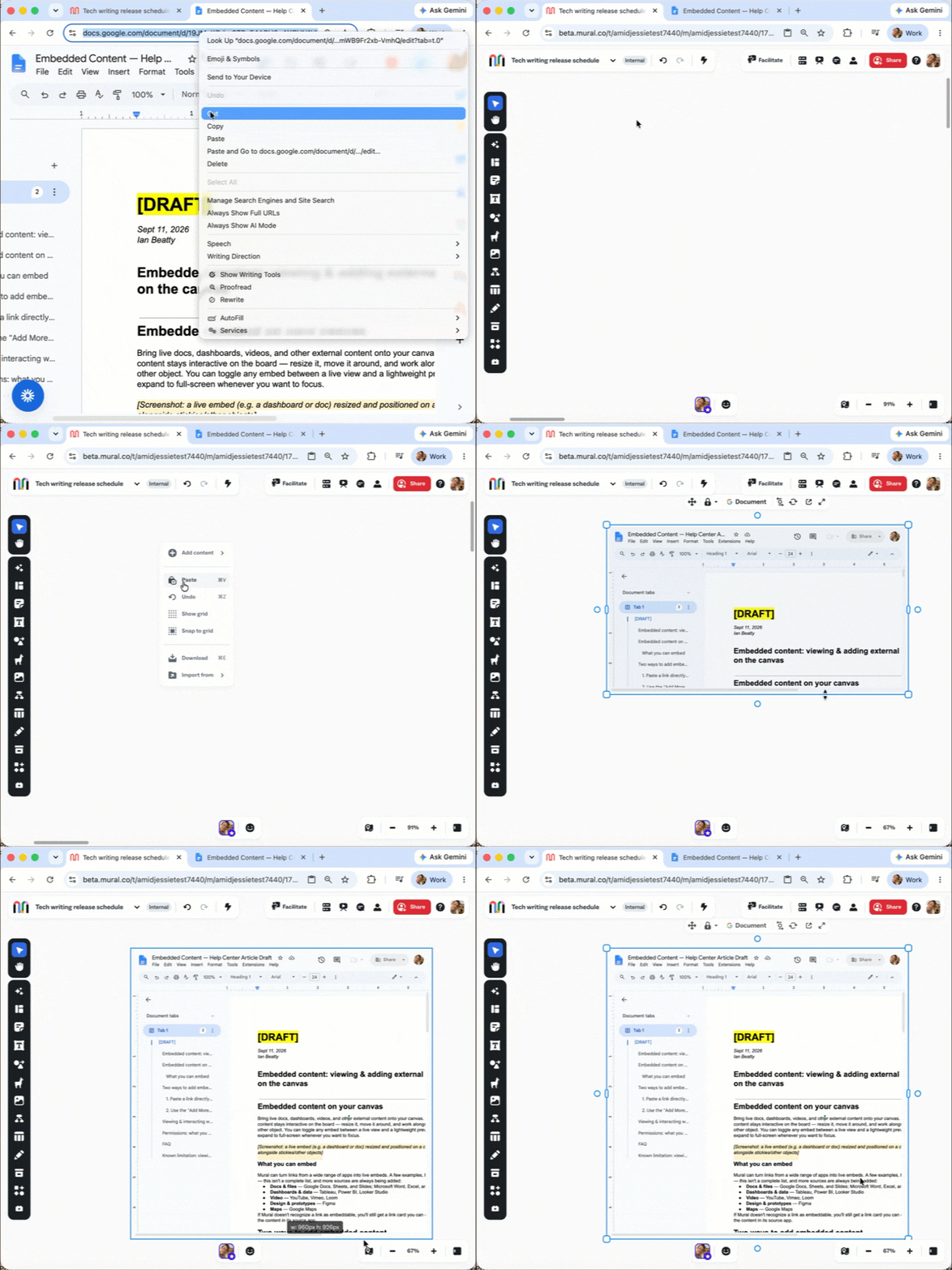
Embedded content is available to Free, Team+, and Business workspaces, with Enterprise availability as a fast follow in October. Access and editing capabilities depend on your permissions in the source app.
New features & enhancements
And a few more updates you’ll notice across Mural:
- More capable Mural MCP – In public preview, MCP read operations now work on archived and view-only murals. Write attempts clearly explain when access is limited, and large-board overviews load faster and more reliably.
- More helpful LUMA onboarding – New LUMA Workplace users are now asked for their job title, department, and profile details during onboarding, helping personalize recommendations and improve workspace reporting.
- Easier-to-find LUMA session plans – Duplicate murals created from the same LUMA session plan now use versioned names, such as “Session title v2,” so you can quickly identify the latest mural.
- Direct links to LUMA method tips – Every LUMA method now has a short /ai link that opens its Tips tab directly, making it easier to share and bookmark AI guidance.
Bug fixes & improvements
This week’s updates bring smoother sign-ins, more reliable data residency, and LUMA updates.
- More reliable data residency migrations – Improved Azure WAF traffic classification helps prevent silent migration and file-upload failures.
- Resolved BYOK template-copy errors – Template copies using BYOK no longer fail because of retry-limit errors.
- Smoother LUMA Workplace sign-in – LUMA Workplace users at organizations whose email domain doesn’t have an MX record no longer get stuck in an endless SSO sign-in loop.
- More accurate LUMA template history – Session Planner’s Recently used list now reliably includes templates from both Mural and LUMA Workplace.
- Faster LUMA Session Planner loading – The template picker now loads faster the first time you open it.
We’re making it easier to bring your work together in Mural, whether it lives on the canvas or somewhere else. More updates are on the way!
WEEKLY UPDATE: SEPTEMBER 22
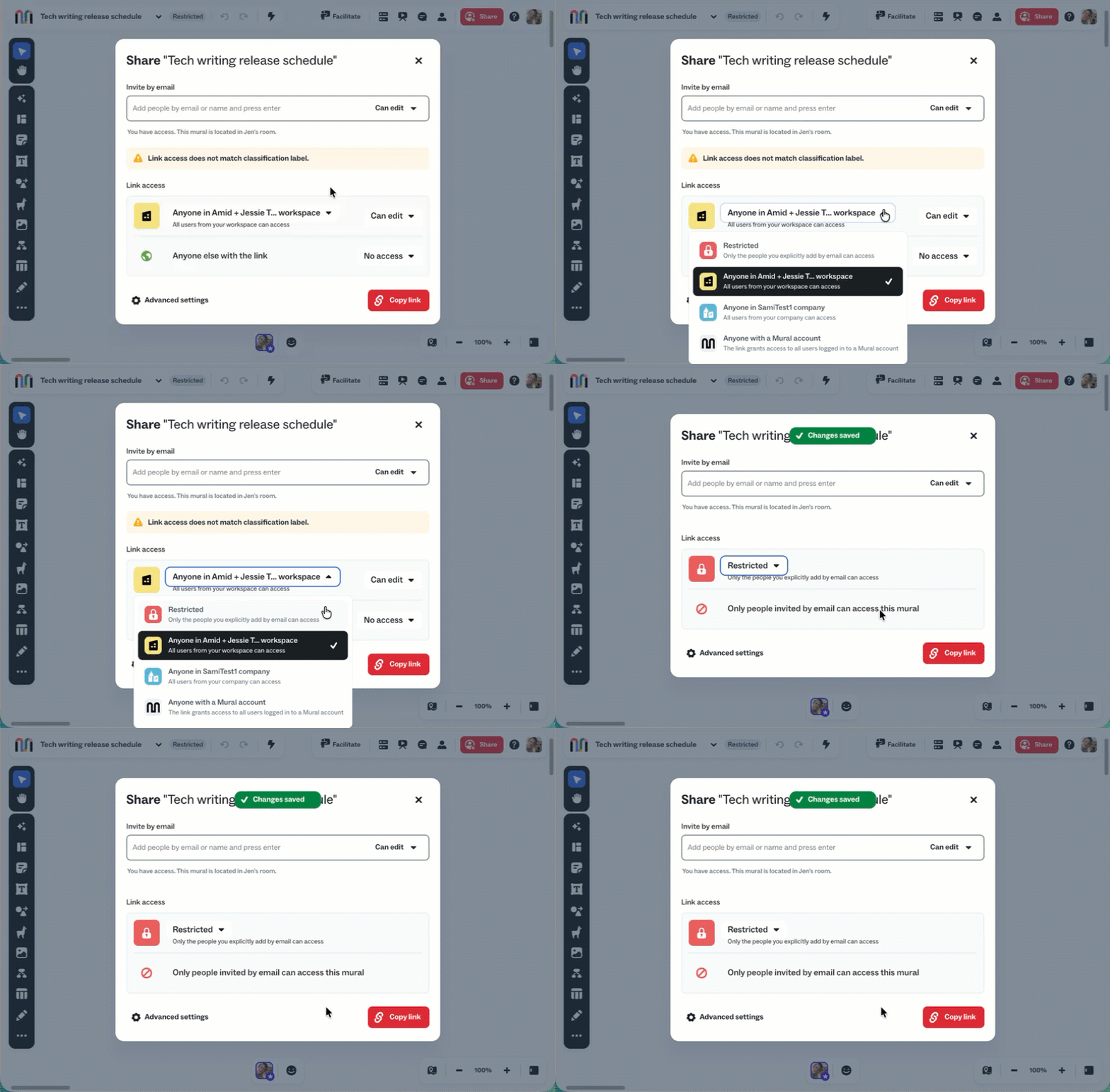
Make data handling clearer with data classification
Enterprise companies can now use data classification labels to communicate how content should be handled. Company admins can enable data classification from the Trust section of the company dashboard, choose a default label, and customize label names and descriptions.
Once enabled, users can apply labels to murals based on their content and sensitivity.
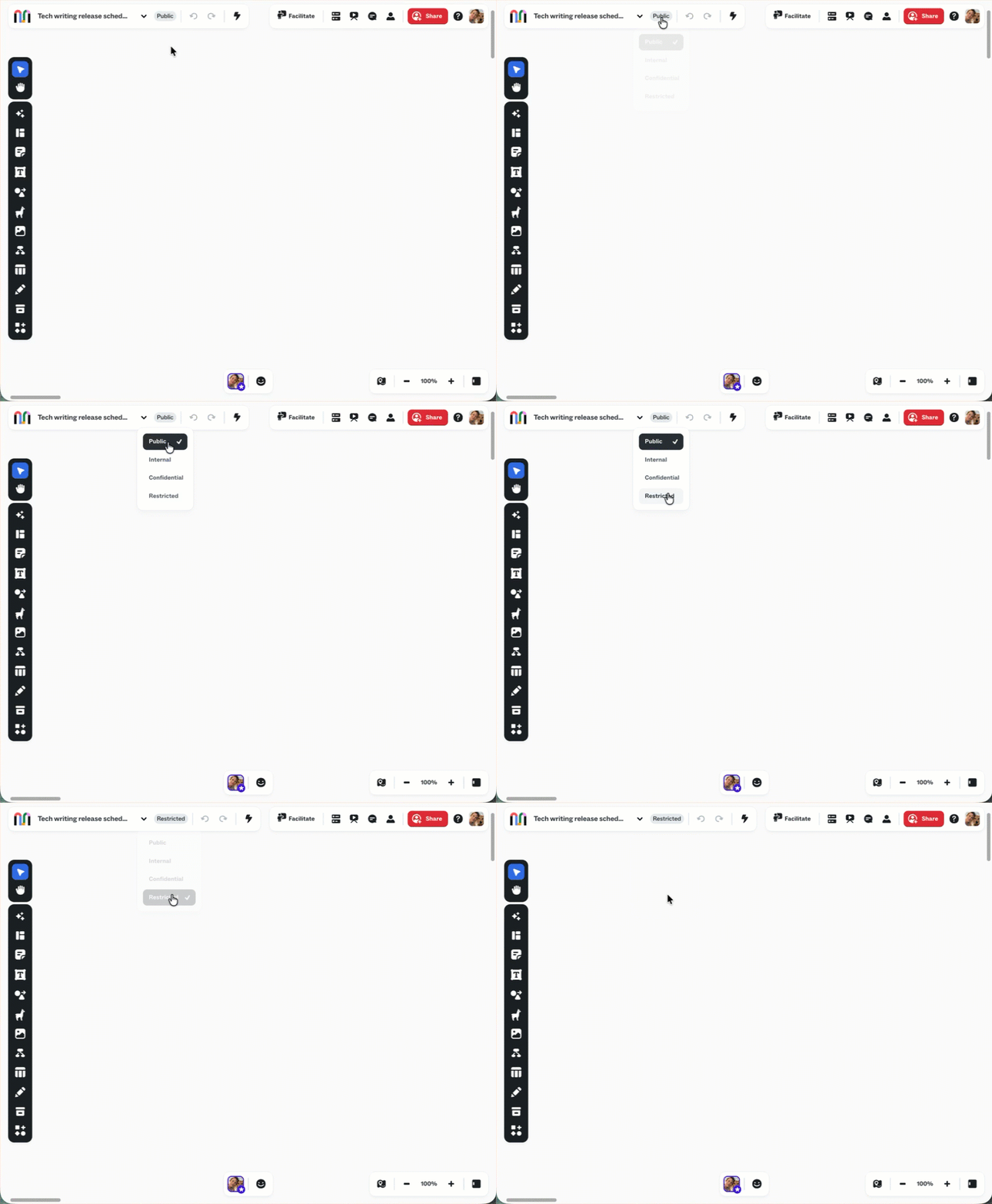
Mural also shows an advisory warning when a mural’s sharing settings are less restrictive than its classification label, helping teams spot potential mismatches before sharing content.
New features & enhancements
This week’s updates bring clearer oversight for Enterprise admins and a more capable tablet experience.
- More detailed company audit logs – Company deletion actions now create detailed audit-log entries, giving admins greater visibility into important account activity.
- Data retention on every company dashboard – Company admins can now find and enable data retention directly from their company dashboard.
- A more complete tablet browser experience – Mural on tablets now includes long-tap context menus, Apple Pencil Drawing Mode, and touch rotation for objects, alongside the full browser experience.
We’re continuing to make it easier to manage sensitive content, support your organization’s policies, and work wherever your team is. More updates are on the way!
WEEKLY UPDATE: SEPTEMBER 15
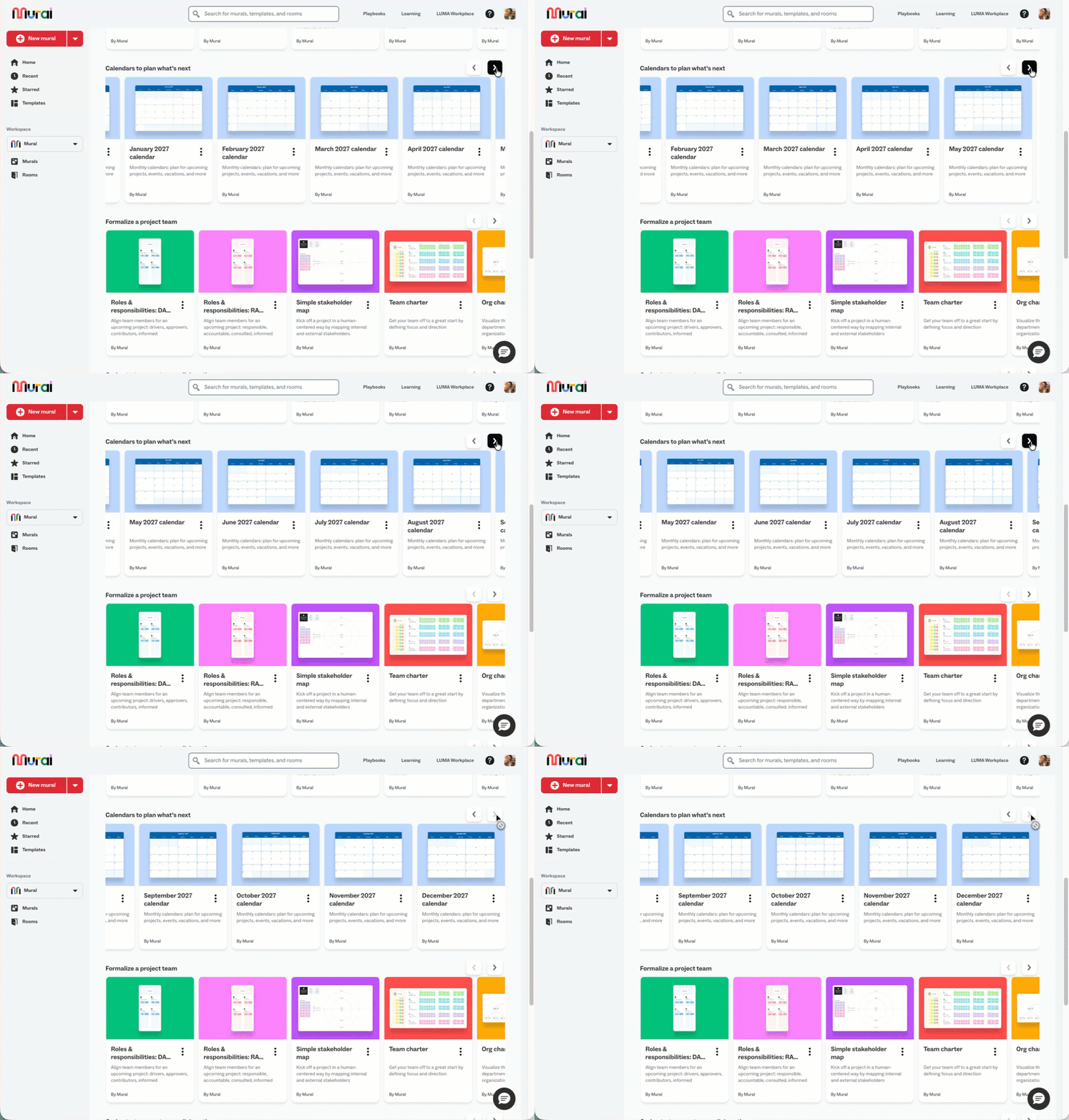
Plan ahead with 2027 calendar templates
Start planning for the year ahead with new 2027 monthly and annual calendar templates. You can find them in Mural’s Plan use case page, which has also been updated to include the latest templates.
Bug fixes & improvements
This week’s updates bring clearer insights and more reliable workspace and mural management.
- More complete Company Insights for EU data-residency customers – Company Insights now includes use-case distribution, use cases by department, and use-case details in Spotlight.
- More reliable invitations after workspace moves – Pending invitations now follow murals when they’re moved between workspaces, preventing outdated memberships and inaccurate analytics.
We’re continuing to make planning, reporting, and administration smoother across Mural. More improvements are on the way!
WEEKLY UPDATE: SEPTEMBER 8
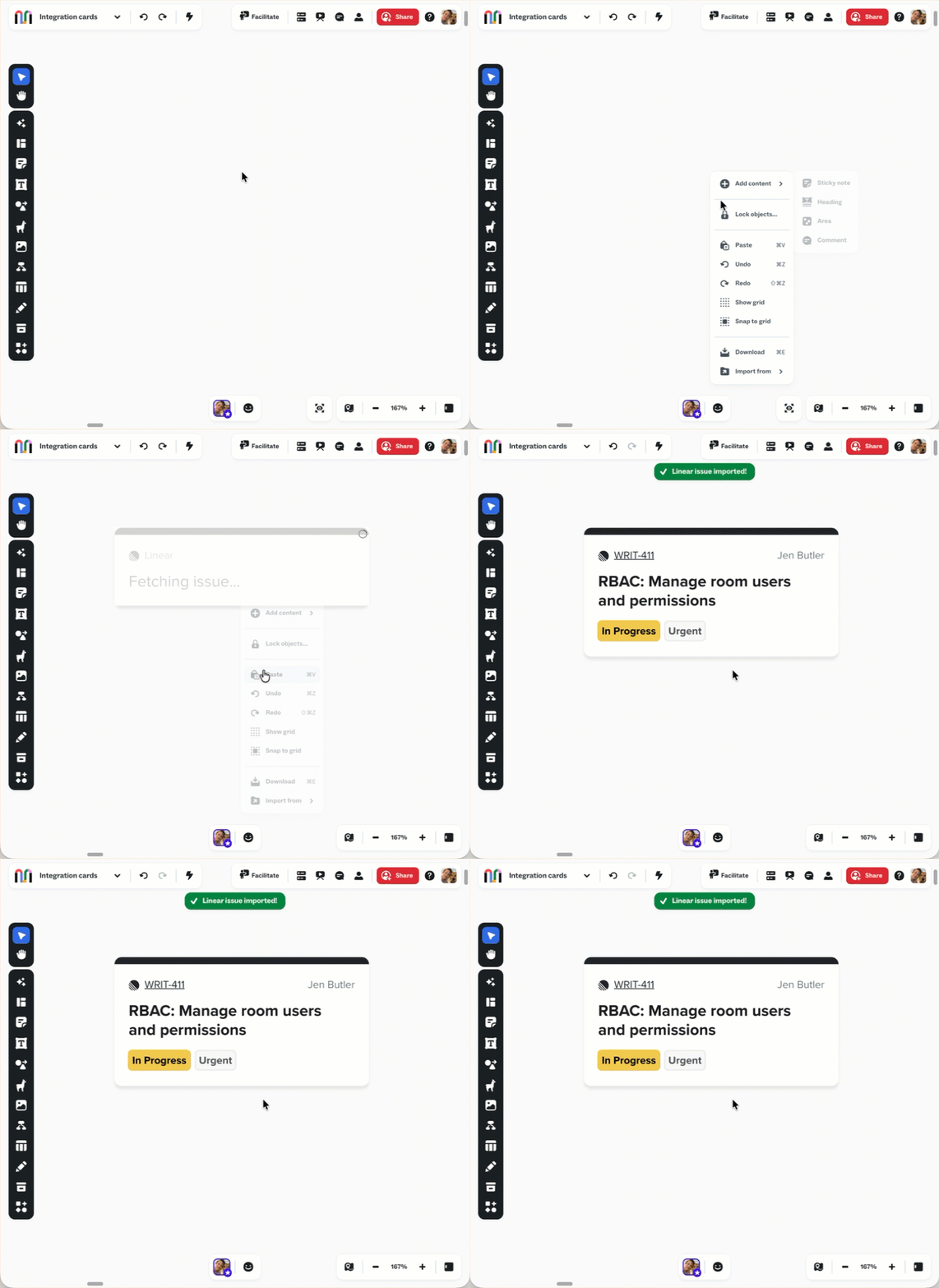
Bring Linear and GitHub work onto the canvas
Managing development work across Mural and your favorite tools just got easier. With the Linear integration, teams can import issues into a mural, view issue details, create issues from sticky notes, and sync updates between Mural and Linear.
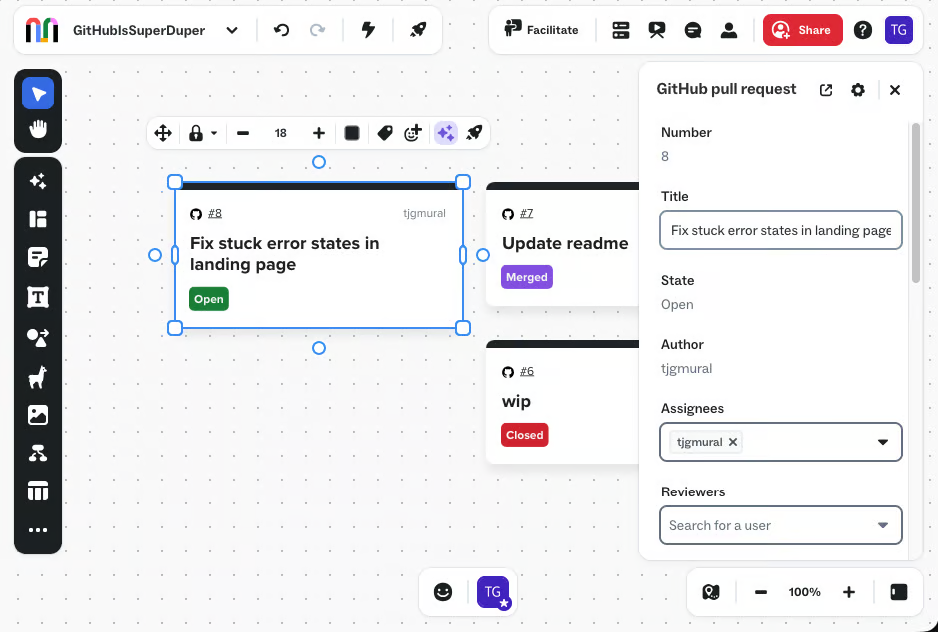
The GitHub integration brings pull requests onto the canvas as interactive cards, making it easier to view and edit work without leaving your mural. You can also send sticky notes to GitHub to create new issues, keeping ideas connected to the work that follows.
Put Mural to work with your AI assistant
Mural MCP is available in public preview, connecting Mural to AI assistants such as ChatGPT, Claude, and Cursor. Use natural language to create and organize murals, add and edit sticky notes, shapes, text, tables, areas, arrows, and connectors, or build diagrams and flowcharts. You can also search Mural’s template library, including LUMA methods, and add a fully styled template to your mural.
Your assistant works within your existing Mural permissions, and MCP actions appear in the mural activity and audit logs with “with AI” attribution. During the preview, Mural MCP is available to members of paid workspaces. Some plans require an admin to enable the integration, and you’ll need to keep the mural open in an active browser tab while your assistant works. Learn more about the Mural MCP public preview.
Bug fixes & improvements
This week’s updates bring more accurate reporting and a smoother experience across Mural and Mural MCP.
- More accurate workspace reporting – Corrected event data that could attribute moved murals to their previous workspace, improving reporting accuracy.
- Smoother Mural MCP experience – Mural MCP now opens the correct member URL when needed, handles unsupported connector-label edits safely, and preserves sticky-note text when applying labels or classifications.
From planning to pull requests to AI-assisted canvas work, Mural is helping teams keep more of their work connected. We’ll catch up again next week!
WEEKLY UPDATE: SEPTEMBER 1
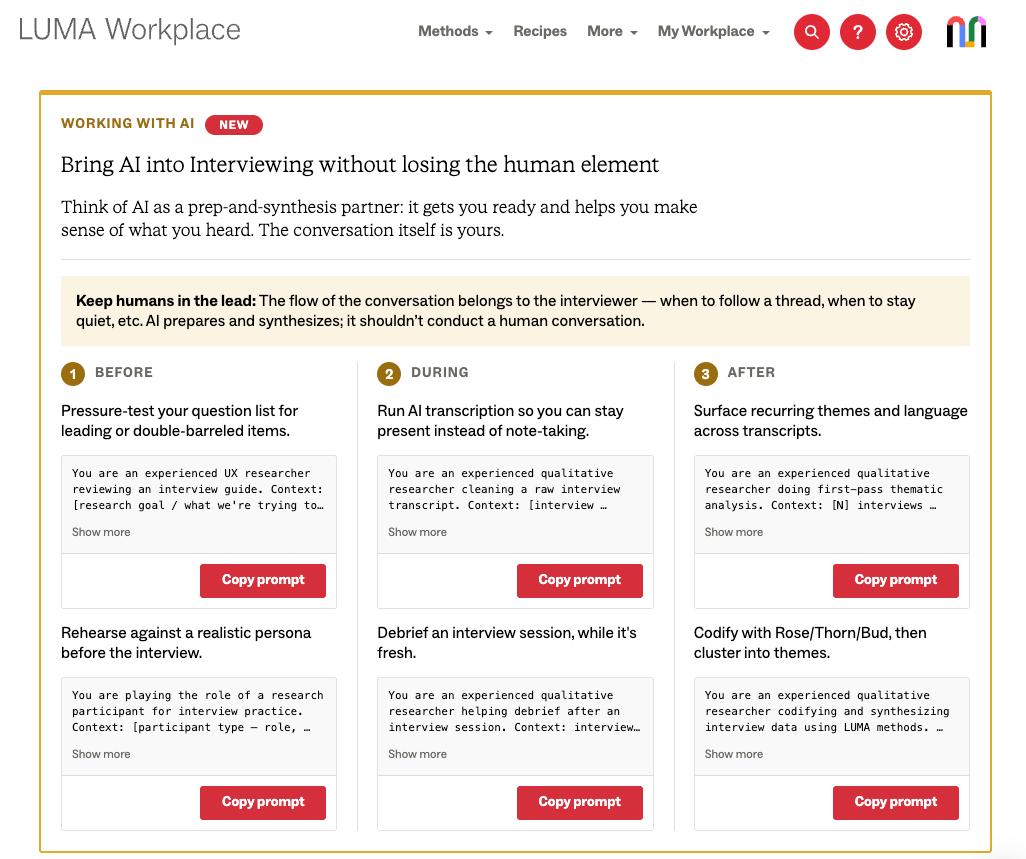
Put AI guidance to work across all 36 LUMA methods
LUMA method guidance now includes practical advice for using AI before, during, and after every one of the 36 methods. Whether you’re preparing for a session, facilitating in the moment, or following up afterward, you can find guidance to help you use AI more effectively.
Bug fixes & improvements
This week’s updates bring clearer templates, more reliable data management, and smoother private-mode editing.
- More reliable private mode sticky notes – Authors can now continue to see and edit their private sticky notes after clicking into them.
- More reliable template picker in LUMA
- Preview links in the template picker now open correctly in Mural.
- Company logos now appear correctly in the session planner template picker.
We’re continuing to smooth the edges and make it easier to get meaningful work done in Mural. More updates coming soon!
August 2026
WEEKLY UPDATE: AUGUST 25
More detailed company insights
Company admins can now see viewer, editor, and creator breakdowns for members, guests, and visitors in the company insights section of the company dashboard.
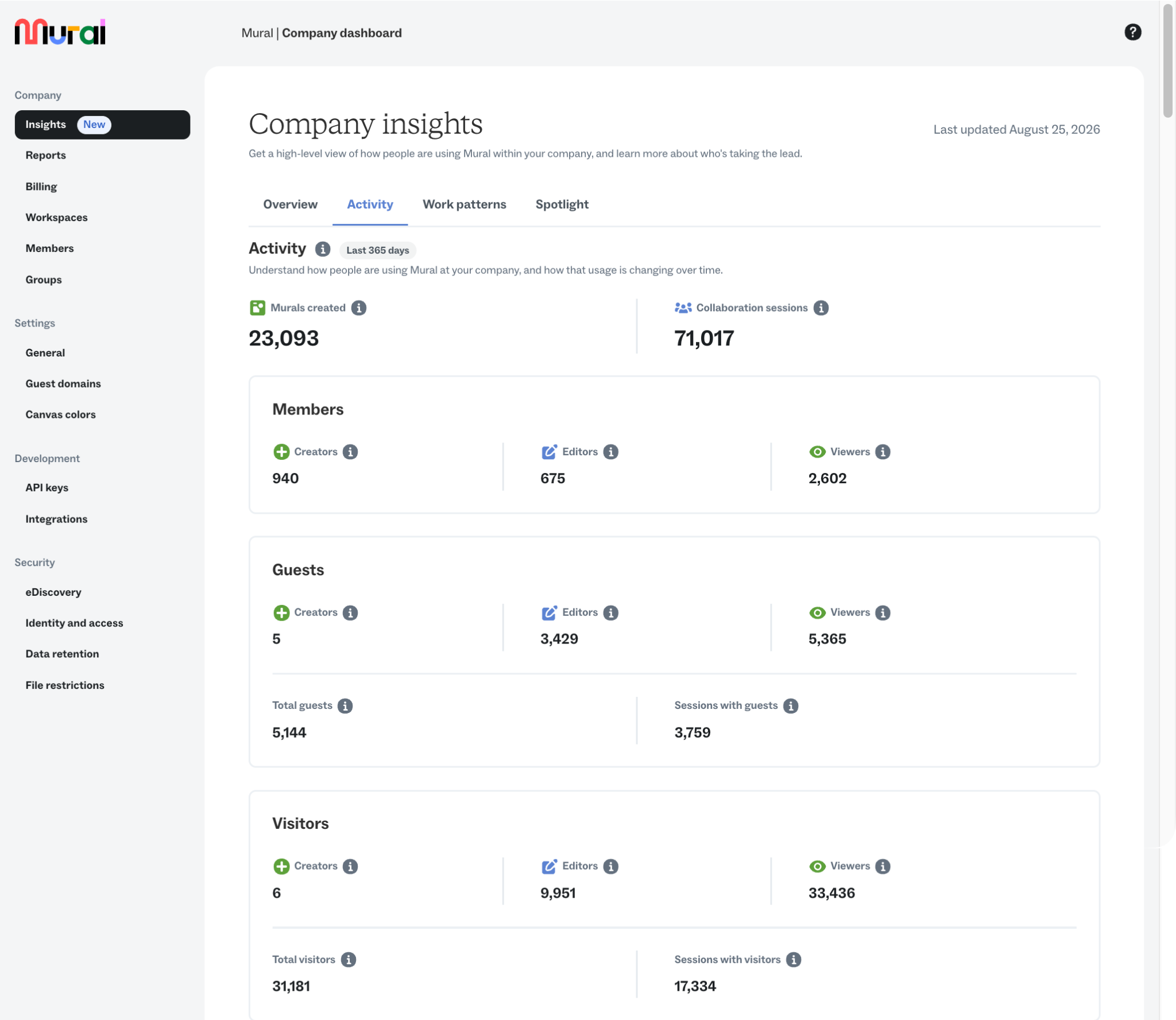
Updated tooltips provide more context for each metric, making it easier to understand how different user types engage with Mural.
Bug fixes & improvements
- More reliable data retention notifications – Archive emails no longer repeat for murals that have already been archived.
- Restored LUMA guidance visuals – The porthole image above “Tips & advice” on LUMA method pages is back.
See you next week with the next round of updates!
WEEKLY UPDATE: AUGUST 18
More flexible SSO and SCIM with multiple identity providers and email domains
Enterprise companies can now support multiple email domains across multiple IdP (identity provider) connections, making it easier to manage authentication in more complex environments.
.png)
This gives larger organizations more flexibility to manage SSO and SCIM across departments and subsidiaries, support different identity systems across the business, and bring organizations together during periods of change, like mergers and acquisitions.
Bug fixes & improvements
This week’s fixes focus on reliability across security, data management, and learning workflows:
- More reliable BYOK and data residency workflows – Fixed an issue that could interfere with copying and uploading assets for customers using BYOK (Bring Your Own Key) and data residency configurations.
- More resilient data retention – Mural now double-checks a mural’s current state before automatically archiving or deleting it, helping prevent errors when a mural has changed since it was first identified for retention.
More flexibility where you need it, smoother workflows behind the scenes. See you next week!
WEEKLY UPDATE: AUGUST 4
Get a clearer view of how your company collaborates
Company insights are now generally available for Enterprise customers, giving company admins a centralized view of activity and collaboration across their organization. From adoption trends to spotlight insights, it's easier to understand how teams are using Mural and identify opportunities to support engagement.
.png)
Bug fixes & improvements
A few more improvements shipped over the past two weeks:
- More reliable meeting integrations – Fixed issues affecting Webex, Zoom, and Google Meet so murals load more consistently during meetings. We also resolved a Webex issue that could leave visitor access stuck on the Warming Up screen.
- Improved Azure DevOps search – Made issue search more reliable when connecting to Azure DevOps.
- Know when reports were refreshed – The Reports page now shows a Last updated timestamp, making it easy to confirm when your report data was most recently refreshed.
- Better keyboard behavior –
- Pressing Escape inside a select dropdown no longer accidentally closes the entire modal.
- The font size dropdown no longer opens automatically when it receives keyboard focus, making canvas navigation smoother and more accessible.
We're continuing to make collaboration more reliable and accessible, with more improvements on the way.
July 2026
WEEKLY UPDATE: JULY 21
A simpler, smarter Mural AI experience
Rolling out in phases, the Mural AI experience has been redesigned so AI is easier to find and use through guided workflows.
Instead of guessing the right prompt or hunting through menus, you can now choose from structured actions that help you generate ideas, diagrams, summaries, rewrites, and more with faster, more predictable results.
Quickly create, organize, and collaborate without starting from a blank prompt, and AI chat remains available within those workflows to help refine ideas, mind maps, and flowcharts.

Mural AI is available on Team+, Business, and Enterprise plans.
Bug fixes & improvements
This week's updates make presenting, collaboration, and administration a little smoother.
- Presentation controls – In addition to Left and Right arrow keys, Up and Down arrow keys can now move between slides in presentation mode, making more presentation clickers compatible.
- Persistent AI attribution – AI attribution now stays visible in Show info, so you can tell when an object was created or edited with AI, even after it’s been updated manually.

We're continuing to make Mural easier to create, facilitate, and collaborate in. More improvements are on the way!
WEEKLY UPDATE: JULY 14
Paste SVG content directly onto the canvas
Working with vector graphics just got easier. You can now paste SVG content directly onto the canvas, including artwork copied from Adobe Illustrator or raw SVG code copied from a website or code editor. Your pasted graphics remain fully scalable and crisp at any zoom level.

Bug fixes & improvements
This week's updates improve performance, reliability, and everyday editing across Mural.
- Faster, more reliable canvas interactions – We rebuilt the underlying mouse interaction system to create a stronger foundation for future improvements to selection and navigation.
- Lower browser memory usage – Reduced memory consumption improves stability on lower-memory devices and helps long-lived tabs reload more quickly.
- Better multi-paragraph pasting – Pasting multiple paragraphs now stacks them vertically instead of arranging them in a grid, making imported text easier to read and edit.
- LinkedIn profile cards restored – Editable LinkedIn URLs are working again for both pasted LinkedIn links and Salesforce-integrated profile cards.
- Improved SSO sign-in – Fixed an issue that could send users signing in with personal Google or Microsoft accounts through the wrong authentication flow.
- More reliable encrypted mural duplication – Resolved an issue affecting some encrypted mural duplication workflows for customers using BYOK (Bring Your Own Key).
We're continuing to refine the Mural experience with improvements that make everyday collaboration smoother and more reliable. See you next week with more updates!
June 2026
WEEKLY UPDATE: JUNE 30
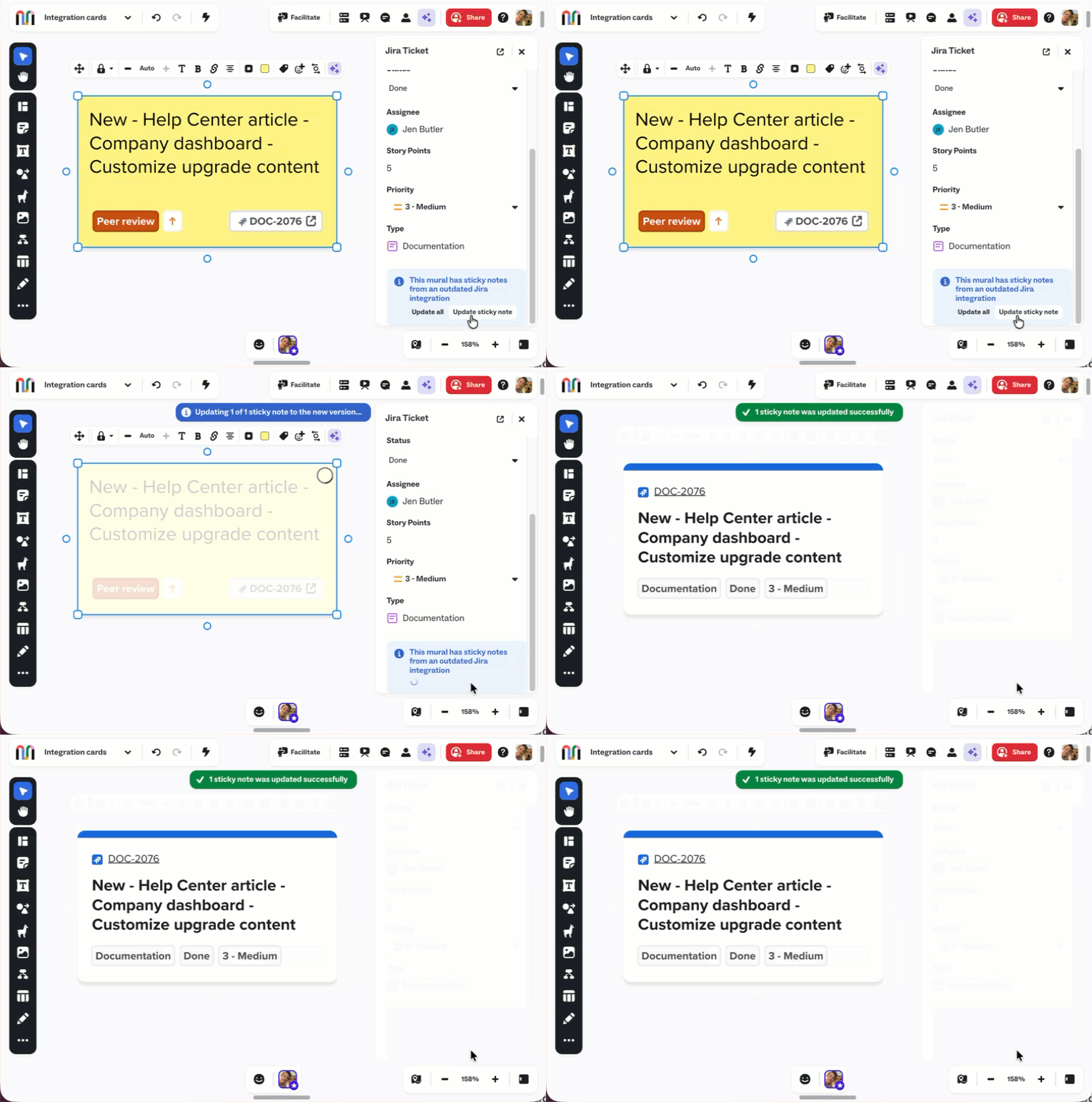
Smarter Jira and Azure DevOps integrations are here
Managing work across Mural and your development tools just got a whole lot easier. Business and Enterprise customers now have access to our upgraded Jira Cloud, Jira Data Center, and Azure DevOps integrations, featuring interactive work item cards that make it easier to view, edit, and manage work without leaving your mural.
The new experience replaces legacy integration-connected sticky notes with richer, more flexible cards that support configurable fields, custom field types, and in-mural editing for supported properties.
Bug fixes & improvements
This week's updates improve integrations, strengthen enterprise workflows, and make everyday collaboration a little smoother.
- Improved eDiscovery troubleshooting – More actionable query error logging and updated operational dashboards make it easier to identify and resolve search and export issues.
- Cleaner integrations experience – Integration icons are now displayed in color, and the integrations list is sorted alphabetically to make finding the right tool faster.
- Better Markdown pasting – Pasted Markdown now formats correctly again, making it easier to bring structured content into your murals.
We're continuing to make Mural's integrations more powerful and reliable so your team can spend less time managing tools and more time collaborating.
WEEKLY UPDATE: JUNE 16
Profile cards and Salesforce integration are now built into Mural
Business and Enterprise customers now have access to the Salesforce integration, helping teams bring customer context into Mural and keep collaboration connected to the systems they use every day.
Users can create editable profile cards directly from LinkedIn URLs, making it easier to build stakeholder maps, account plans, and relationship-focused workflows.
.gif)
Bug fixes & enhancements
A few more improvements you'll notice across Mural this week:
- Better table experience – Tables now behave more consistently with the rest of Mural, with improved object selection, interaction feedback that adapts to zoom level, support for multi-cell text formatting, and a more predictable editing experience.
- Azure DevOps improvements – Fixed synced-item offline errors, restored missing fields in "Add More Fields," and added Area Path and Iteration Path filters for imports.
Stay tuned as we continue to refine the details to make collaboration feel effortless.
WEEKLY UPDATE: JUNE 9
More flexibility for Free plan workspaces
We've updated how murals work on the Free plan. Instead of needing to archive older murals before creating new ones, you can now keep all of your murals visible in your dashboard and continue creating.
On the Free plan, the three most recently created murals remain editable. Older murals stay accessible as view-only, making it easier to keep your work, revisit past ideas, and continue creating without extra cleanup.
.gif)
New features & enhancements
A few more updates you'll notice across Mural this week:
- Editable profile cards – You can now edit the name and role fields on profile cards, including profiles pasted from LinkedIn and contacts imported from Salesforce.
- Microsoft 365 Copilot agent update – We've updated Mural's Microsoft 365 Copilot agent to Microsoft's newer declarative agent architecture, improving reliability, enterprise governance, observability, and compatibility with the latest Copilot capabilities.
More improvements are on the way!
WEEKLY UPDATE: JUNE 2
Refinements for everyday work
We're continuing to invest in the details that make everyday work in Mural feel faster, clearer, and more reliable. This week brings a collection of enhancements and fixes across integrations, planning workflows, and collaboration experiences.
Bug fixes & improvements
This week's updates focus on making connected workflows more intuitive and reducing friction across the platform.
- Jira and Azure DevOps integrations – Improved compatibility with Azure DevOps fields and made Jira Data Center connection settings clearer and easier to understand.
- More accurate AI-generated headings – Suggested headings now respect the language of the selected sticky note content.
- Improved outline behavior – Nested items can now be indented two levels deep instead of flattening after the first level.
Thanks for building with us. We'll keep polishing the experience, one improvement at a time.
May 2026
WEEKLY UPDATE: MAY 26
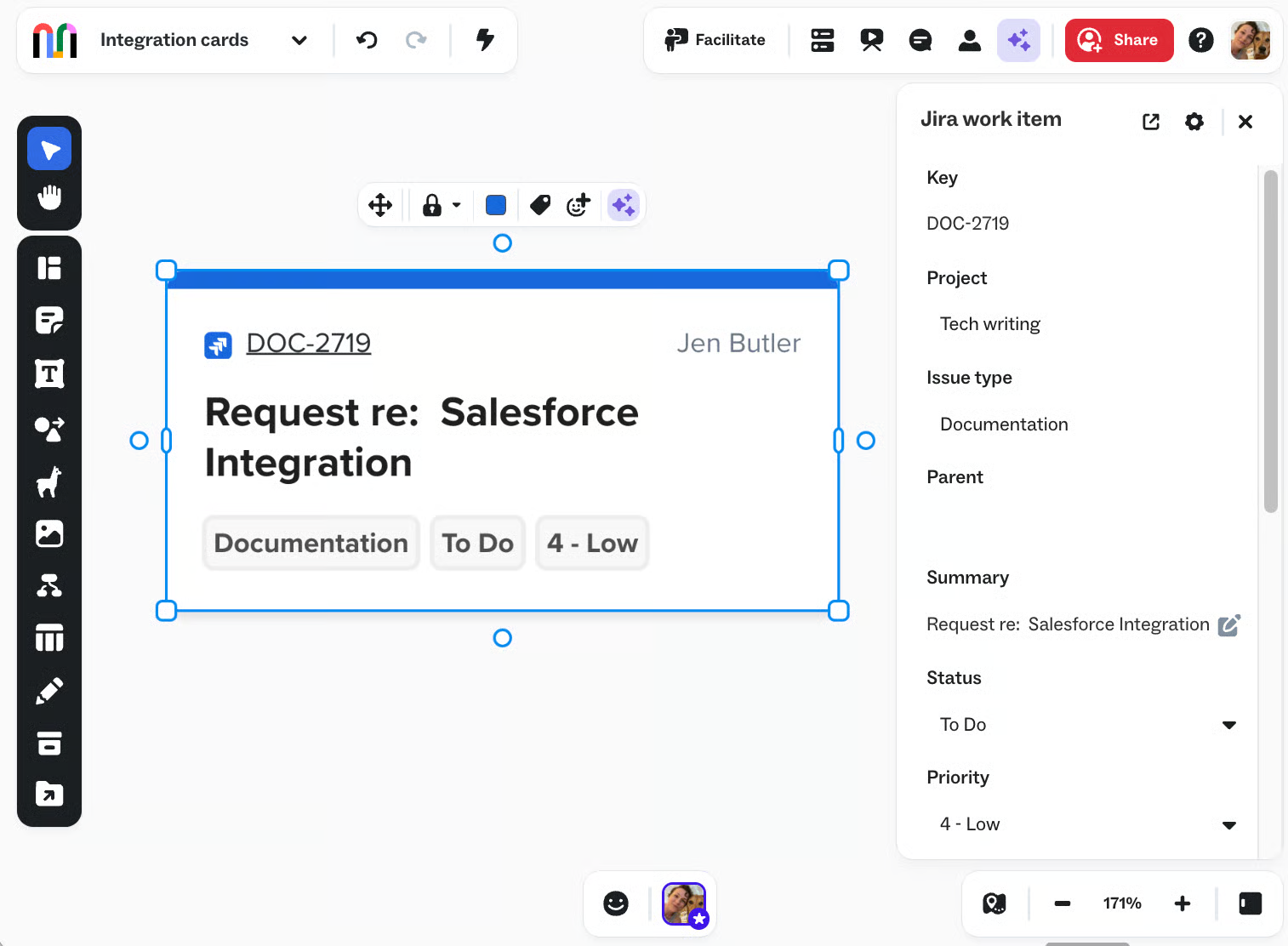
Better Jira and Azure DevOps workflows, right where you work
Jira and Azure DevOps integrations just got a major upgrade, with interactive cards, richer work-item details, configurable fields, and improved editing directly inside Mural. Existing integrations-connected sticky notes can now be upgraded to the new experience by company admins, giving teams better visibility and more flexibility when working with connected tasks.
Bug fixes & improvements
This week’s fixes focus on smoother workflows, cleaner integrations, and fewer frustrating interruptions while collaborating.
- LinkedIn company parsing improvements – Company names with apostrophes now import and render correctly in profile cards.
- Smarter Smart Planner behavior – Fixed several issues affecting descriptions, undo actions, sticky creation, and right-click add-sticky flows.
- More reliable drag and drop – Resolved an intermittent issue where dragging files into a mural could unexpectedly open them in a new browser tab instead of placing them on the canvas.
Thanks for collaborating with us! We’ll keep polishing the details so your team can stay focused on the work that matters most.
WEEKLY UPDATE: MAY 18
Find the right mural faster with smarter search results
We’ve rolled out improved mural search ranking across all plans to help you find the murals you’re actually looking for—especially the ones you’ve worked in before.
The updated ranking system now uses more complete recency and access history data to better surface relevant murals in search results, making it easier to jump back into active work without digging through long lists.
Bug fixes & improvements
This week’s updates focus on smoother workflows, clearer messaging, and a few small quality-of-life improvements across the platform.
- Better Microsoft Teams guest handling – Integrated workflows now treat inaccessible Teams rooms as an expected empty state instead of triggering a hard failure.
- More intuitive Excel pasting – Pasting a single Excel cell in a mural now creates a sticky note instead of a text box, making spreadsheet imports feel more natural.
- Jira modal fix – Priority dropdown options now display correctly at different browser zoom levels.
- Clearer restricted-file messaging – Imported files now show more helpful error messages when access is limited by company-configured external-user restrictions.
Thanks for searching, sharing, and collaborating with us every week. More improvements are already on the way!
WEEKLY UPDATE: MAY 12
Customize how company colors and themes appear across Mural
Company admins can now reorder company colors and themes with simple drag-and-drop controls. Your custom order will now appear consistently anywhere those colors and themes are used across Mural, helping teams stay organized and find the right brand assets faster.

Bug fixes & improvements
This week’s updates focus on smoother workflows, cleaner interfaces, and more reliable integrations across the platform.
- More predictable custom color editing – The custom color picker now behaves more consistently when editing colors or using context-menu actions while switching between saved colors.
- Simpler paste options experience – The paste options modal now has a cleaner layout, less extra text, and clearer actions. “Paste as text” has also been renamed to “Paste as one paragraph” for better clarity.
- More reliable Microsoft file imports – Fixed an issue that could cause SharePoint and Microsoft Teams file imports to fail in the Microsoft file picker flow.
- Improved OneDrive embedding behavior – Resolved inconsistent OneDrive widget placement to create a more reliable embedded-file experience.
- Improved data consistency and quality – Standardized workspace plan and billing logic, improved visitor-identification accuracy, and cleaned up records across downstream systems to support more reliable reporting and analytics.
We’re continuing to polish the details that help teams collaborate with more confidence and less friction. More updates coming soon!
WEEKLY UPDATE: MAY 5
New features & enhancements
A couple improvements you’ll notice across Mural this week:
- Launch LUMA Workplace sessions directly into Mural – LUMA Workplace sessions can now be launched into a Mural canvas with one click, helping facilitators move more smoothly from workshop planning to live collaboration.
- Smarter Smart planner editing – Fixed an issue where typing hyphens into Smart Planner widget descriptions could unexpectedly overwrite the summary field.
We’re continuing to streamline collaboration workflows and smooth out the details that help teams move faster with fewer interruptions.
April 2026
WEEKLY UPDATE: APRIL 28
Small fixes, smoother sessions
This week is all about the little things that make a big difference. We’ve rolled out a few targeted fixes and improvements to help your sessions run more smoothly and keep your workflow uninterrupted.
Bug fixes & improvements
A few small updates to keep things running smoothly:
- AI diagram creation fix – Resolved an issue where creating a diagram could get stuck in certain workspaces, so you can get back to building without interruptions.
- Timer in Presentation mode – The timer now opens and works correctly in Presentation mode, so facilitators can manage time without breaking the flow.
- Cleaner area toolbar – Removed the redundant “Absorb” button since areas already handle grouping automatically, simplifying your workspace.
A few less bumps, a little more flow. See you next week!
WEEKLY UPDATE: APRIL 21
Now available: self-serve workspace consolidation
Workspace consolidation is now fully self-serve for company admins. Instead of relying on manual content moves or working with Mural Support, admins can now consolidate multiple workspaces into a single destination workspace—directly from the company dashboard.
All content from selected source workspaces (rooms, folders, and murals) is moved into the destination workspace. You can start migrations immediately or schedule them for later, and cancel if plans change. Once complete, permissions align with the destination workspace to keep everything secure and consistent.
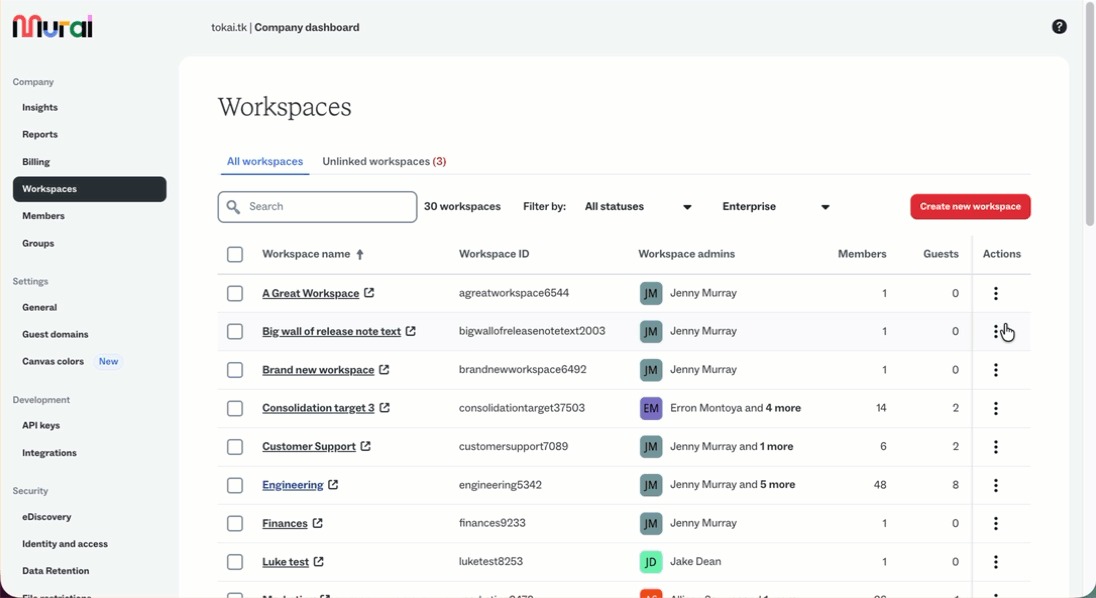
Admins also get visibility into what’s being migrated—including member counts and overall content scope—before confirming, making it easier to plan and execute large-scale changes with confidence.
More robust pasting from spreadsheets
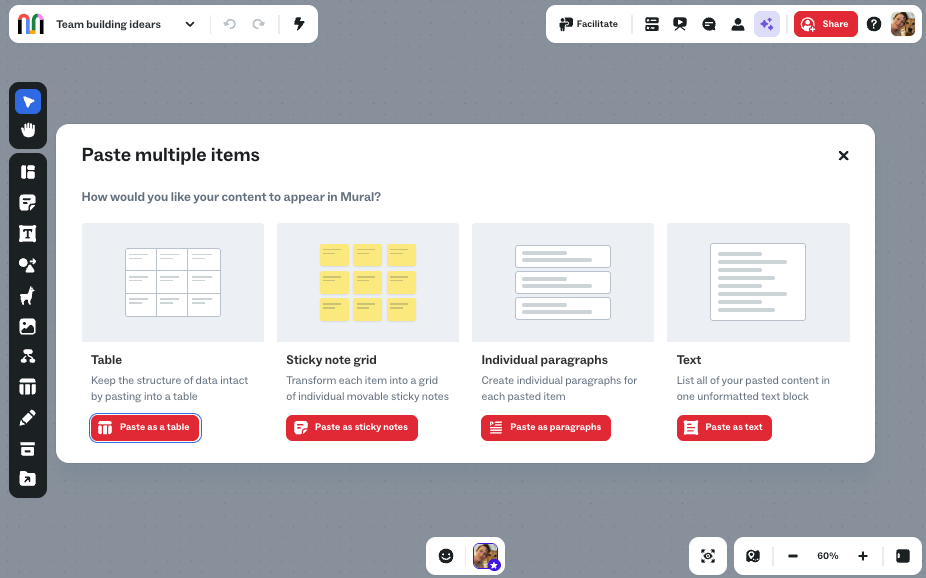
We’ve introduced a new, more flexible way to paste content from spreadsheets and other tools into Mural.
When pasting multiple lines of content, you can now choose how it appears on the canvas—whether as a table, a grid of sticky notes, individual paragraphs, or a text box. This makes it much easier to bring structured data into Mural and quickly turn it into something you can work with visually.
Bug fixes & improvements
This week’s updates bring better performance, clearer permissions, and more reliable workflows across the board (er… mural?).
- Clearer locking controls – Updated locking language across the product to make permissions easier to understand.
- More reliable data retention – Fixed issues that caused job failures and inconsistencies when restoring murals.
- Salesforce chat fix – Customer details now reliably appear in Salesforce Chat within the Mural app.
- Clearer error messages – Error messages for LinkedIn-based company searches now include the URL to help diagnose transient 404 issues faster.
- Updated default emoji reactions – We added the green checkmark emoji to the reaction quick picker because of how frequently it’s used.
We’re continuing to make it easier to scale, organize, and collaborate in Mural. More updates coming soon!
WEEKLY UPDATE: APRIL 14
Approve or deny guest access—right from your inbox
Managing guest access just got a whole lot easier. When enabled by a company admin, room and mural owners can now approve or decline guest reactivation requests directly from email—no need to open Mural.
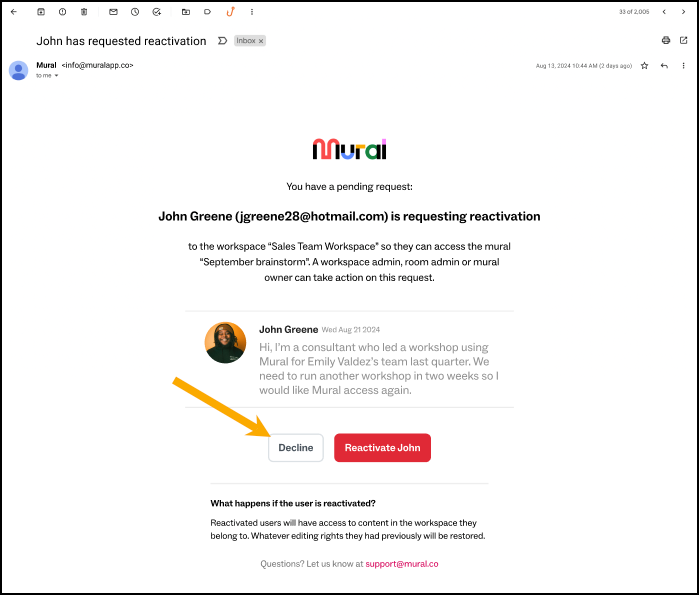
When a guest requests access, you’ll get all the context you need (including their reason) in an email, and you can take action instantly. This means faster decisions, fewer interruptions, and more control over who has access to your content.
Bug fixes & improvements
This week’s updates focus on clearer access controls and more reliable integrations behind the scenes.
- Safer custom invite messages – Custom invite messages are back across all plans, with added protections that prevent including URLs or email addresses to reduce phishing risk.
- Slack integration visibility fix – Slack now only appears as an option when it’s actually enabled for your organization.
- New Agile Coach / Scrum Master role – Added a new role option in the template modal to help these teams find the right starting points faster.
We’re continuing to make access management smoother and collaboration more reliable. See you next week!
WEEKLY UPDATE: APRIL 8
Run smoother sessions with bulk lock & unlock
Keeping a live session on track just got a whole lot easier. Facilitators can now lock or unlock objects in bulk directly from the Facilitation menu—whether that’s everything on the canvas, selected objects, or specific object types.
You can also choose who has the ability to unlock—facilitators only, or any member—giving you even more control over how your session runs. The result? Fewer interruptions, no more scrambling to fix accidental edits, and a smoother, more focused experience for everyone involved.
.gif)
Bug fixes & improvements
- Faster Jira project selection – The Send to Jira modal now includes searchable project selection, making it much easier to navigate large project lists and reducing load time friction.
- More complete member reporting – Added “Membership Join Date” to the Workspace report and “Last Invitation Date” to the Total Members report, giving you clearer insight into the member lifecycle.
That’s it for this week. Happy facilitating!
March 2026
WEEKLY UPDATE: MARCH 31
Get started faster with templates built for agile coaches and scrum masters
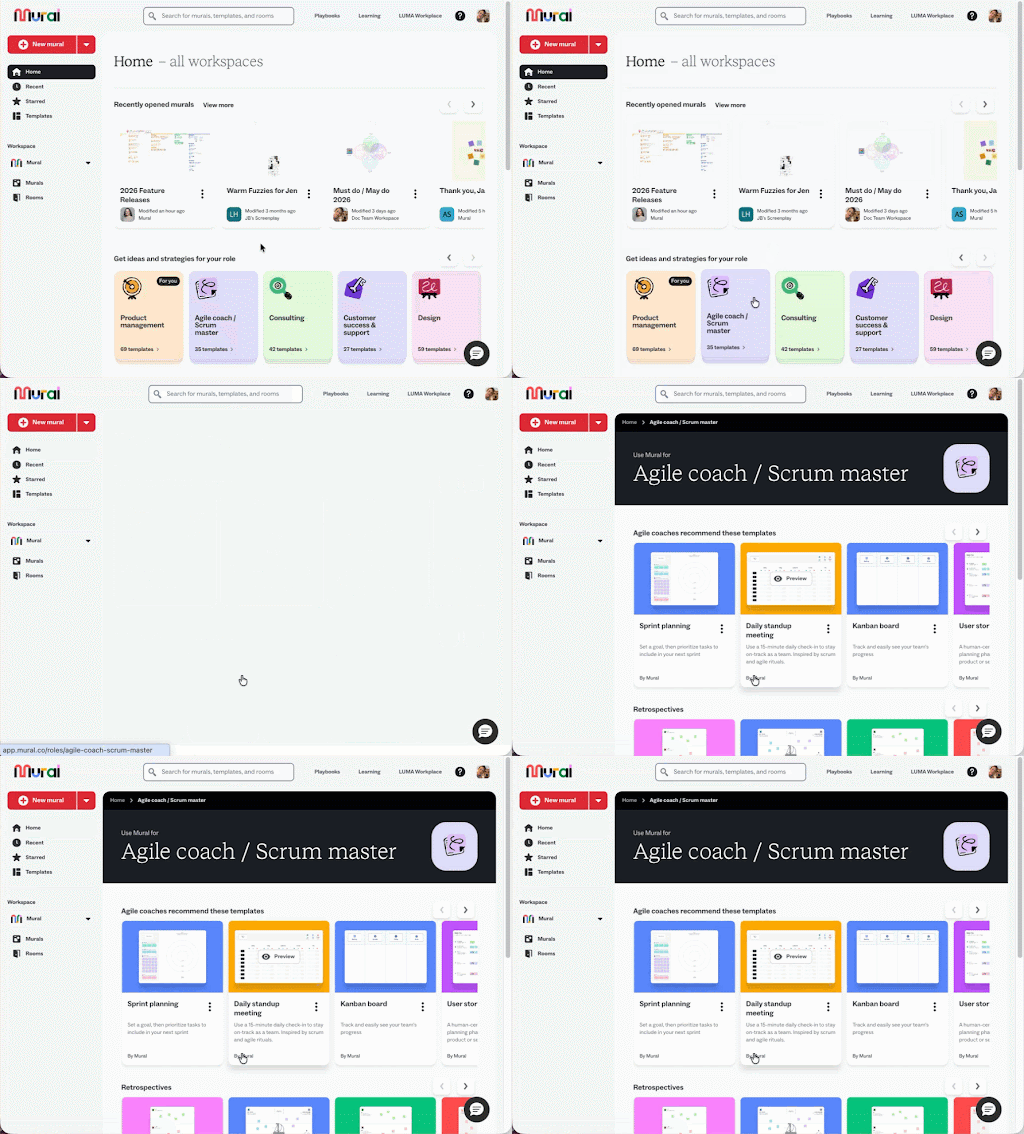
We’ve introduced a new role-based entry point on the Mural dashboard that gives agile coaches and scrum masters immediate access to templates tailored to how they actually work.
Instead of digging through generic options, you’ll find ready-to-use templates for key ceremonies like sprint planning, retrospectives, and standups—right up front. That means less time searching and more time facilitating effective sessions using proven workflows.
Bug fixes & improvements
This week’s updates bring smoother collaboration, clearer access, and more reliable performance across Mural:
- Access requests – Users now see a clear “Request access” screen when they don’t have permission to view a mural, instead of hitting a dead-end error page.
- AI insights visibility – New mural insights show AI-generated content and AI adoption, helping members better understand how AI is being used.
- Membership reporting – Added last created, edited, and viewed dates across reports, plus last invitation date to the Total Members report, giving deeper visibility into user activity.
- PDF import fix – Resolved an issue that caused some PDF imports to fail during upload.
- Jira reconnection fix – Fixed a bug where some users were repeatedly prompted to reconnect Jira when interacting with smart stickies.
- Timer sync improvements – Timers now stay aligned with server time after reloads, preventing unexpected resets or drift.
- Template preview readability – Long or punctuation-heavy template titles now display more cleanly in the sidebar.
- Mural duplication fix – Users can now reliably duplicate their own murals again.
More ways to move faster (and fewer bumps along the way). See you next week!
WEEKLY UPDATE: MARCH 24
A more flexible, more precise color palette
We’ve updated Mural’s global color palette to give you more flexibility and precision when working with color. Yellow and orange now live in separate columns—making it easier to choose more accurate, expressive hues without second-guessing.
We’ve also expanded and refined the palette with new light orange and dark yellow shades, improved color balance, a darker gray for better contrast, and a 50% white transparency option.
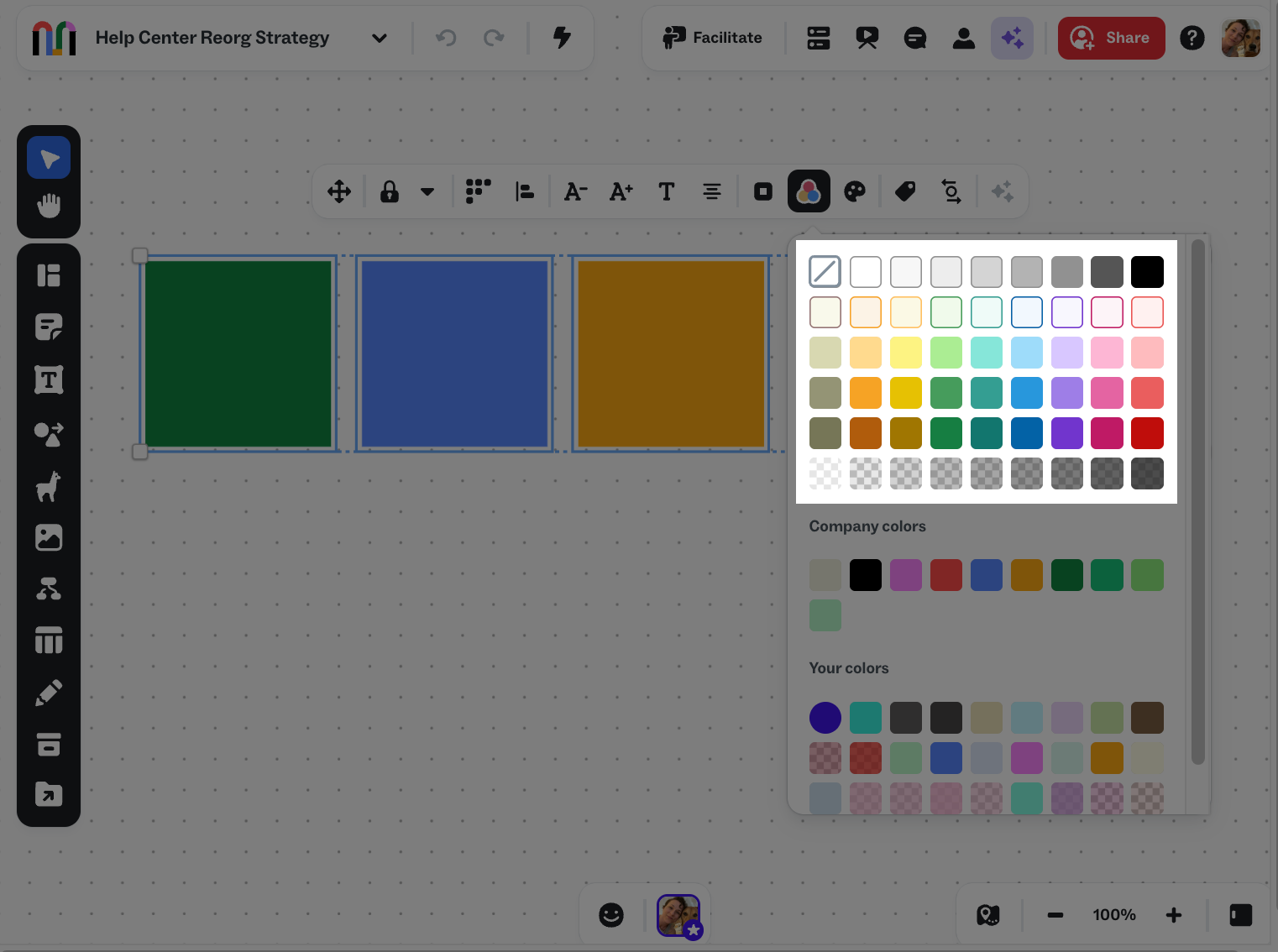
Whether you’re organizing ideas or crafting polished outputs, it’s now easier to get your visuals just right.
Bug fixes & improvements
This week’s updates bring smoother facilitation, better visibility, and more reliable integrations across Mural.
- Object activity history at your fingertips – Open an object’s activity directly from its context menu to quickly see its change history—no more digging through the full activity feed.
- Bulk lock and unlock for facilitators – Manage editing access during sessions by locking or unlocking all objects, selected items, or objects by type.
- Deeper member lifecycle insights – Workspace Membership reports and APIs now include fields like Pending Invite, Invited Date, and Reactivation status for better visibility into user activity.
- Streamlined integrations – Planner, Asana, and Rally integrations no longer rely on Workato, simplifying the integration flow.
- More reliable AI experiences – Fixed issues with sentiment classification and clustering results syncing.
- Improved export stability – Exporting large sticky note murals to CSV now completes reliably.
- HEIC image uploads restored – You can now upload .heic images as expected.
- More consistent APIs – Updated API structures to be more predictable and easier to work with across services.
- Clearer Salesforce access experience (Public preview) – Users without access to a mural in Salesforce embeds now see a “Request access” option instead of a generic error.
More clarity, more control, and fewer hiccups—just how collaboration should be.
WEEKLY UPDATE: MARCH 17
Preview templates without signing in
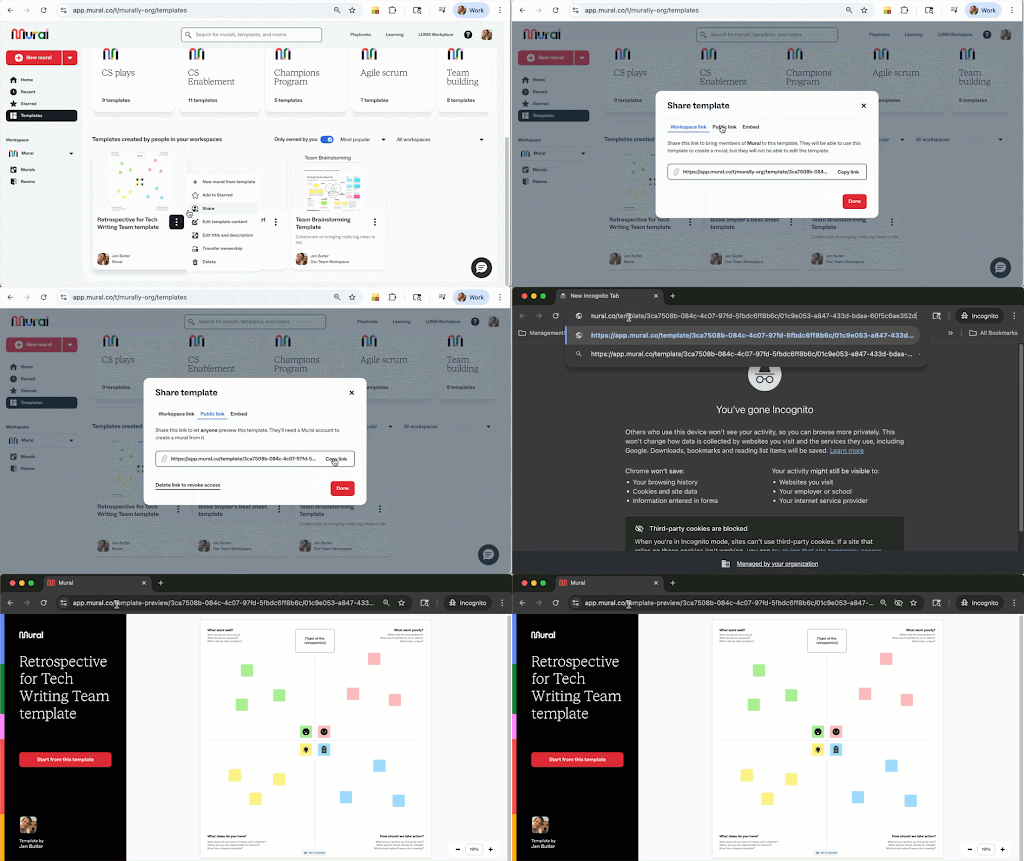
Now, when you share a template using a public link, recipients can view it instantly—no sign-in or account required. This makes it easier to showcase your work, share ideas, and help others quickly understand the value of your template.
If they decide to use it, they’ll be prompted to sign in or sign up.
New features & enhancements
And a few more updates to help you customize, analyze, and create with more flexibility:
- Richer membership report insights – Added Last Created, Last Edited, and Last Viewed dates to the Mural Memberships report, giving company admins clearer visibility into mural activity and usage patterns.
Bug fixes & improvements
This week’s fixes bring smoother interactions, more reliable sessions, and stronger data consistency:
- AI summarization selection fix – Resolved an issue where selecting too many objects could cause the selection to get stuck.
- Voting session reliability – Voting now starts correctly when using “Selected section,” fixing a 400 error that previously blocked sessions.
- Private mode consistency – Objects already being edited now become private immediately when Private mode is turned on.
- API token handling – Fixed an issue where simultaneous requests could trigger duplicate access token requests for the same integration.
- Accurate reporting data – Reprocessed February event data to ensure all customer-facing reports reflect correct and up-to-date metrics.
More ways to share, smoother ways to collaborate—see you next week!
WEEKLY UPDATE: MARCH 10
More flexible canvas navigation
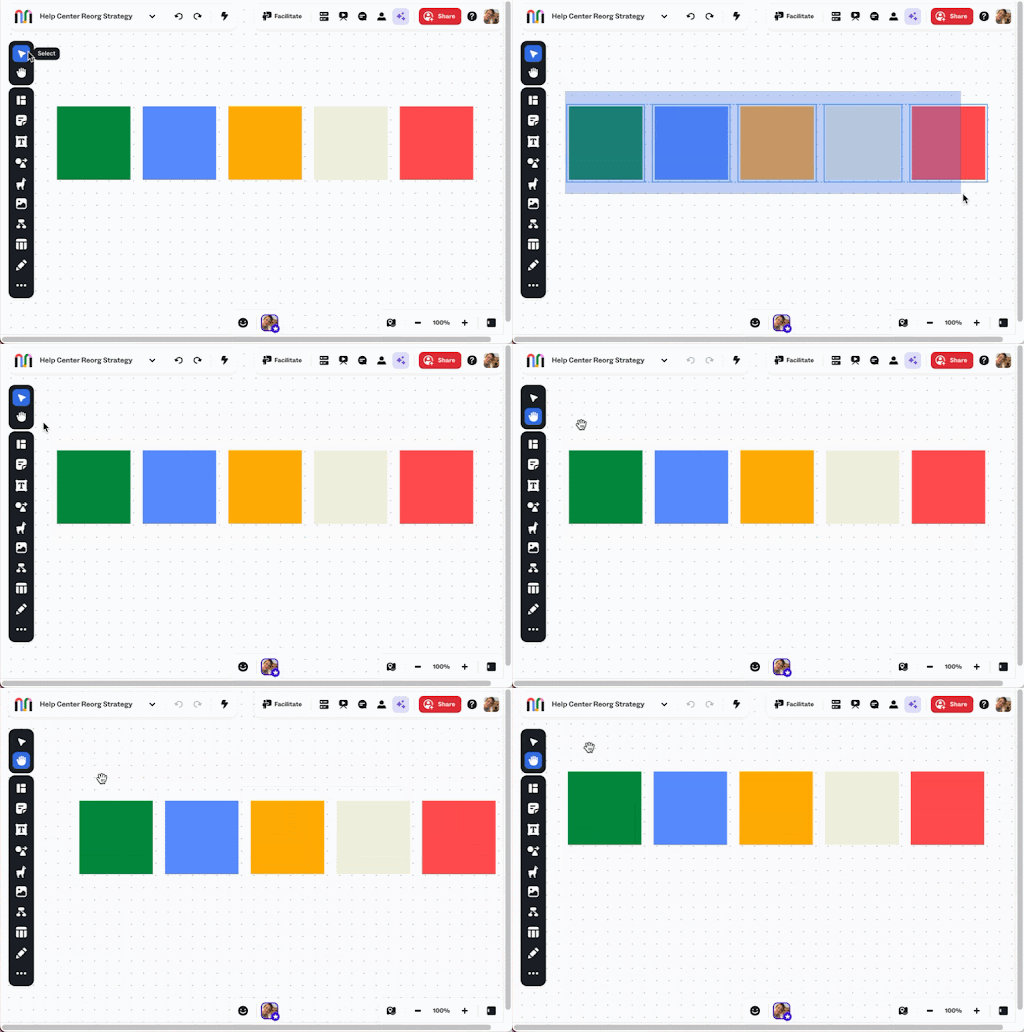
We’ve updated how navigation works on the canvas to give you more flexibility and clearer control over how you move and select content.
Left click + drag now creates a marquee selection by default, making it easier to quickly grab multiple objects. A new Select and Hand tool in the left toolbar lets you switch between selecting and panning the canvas.
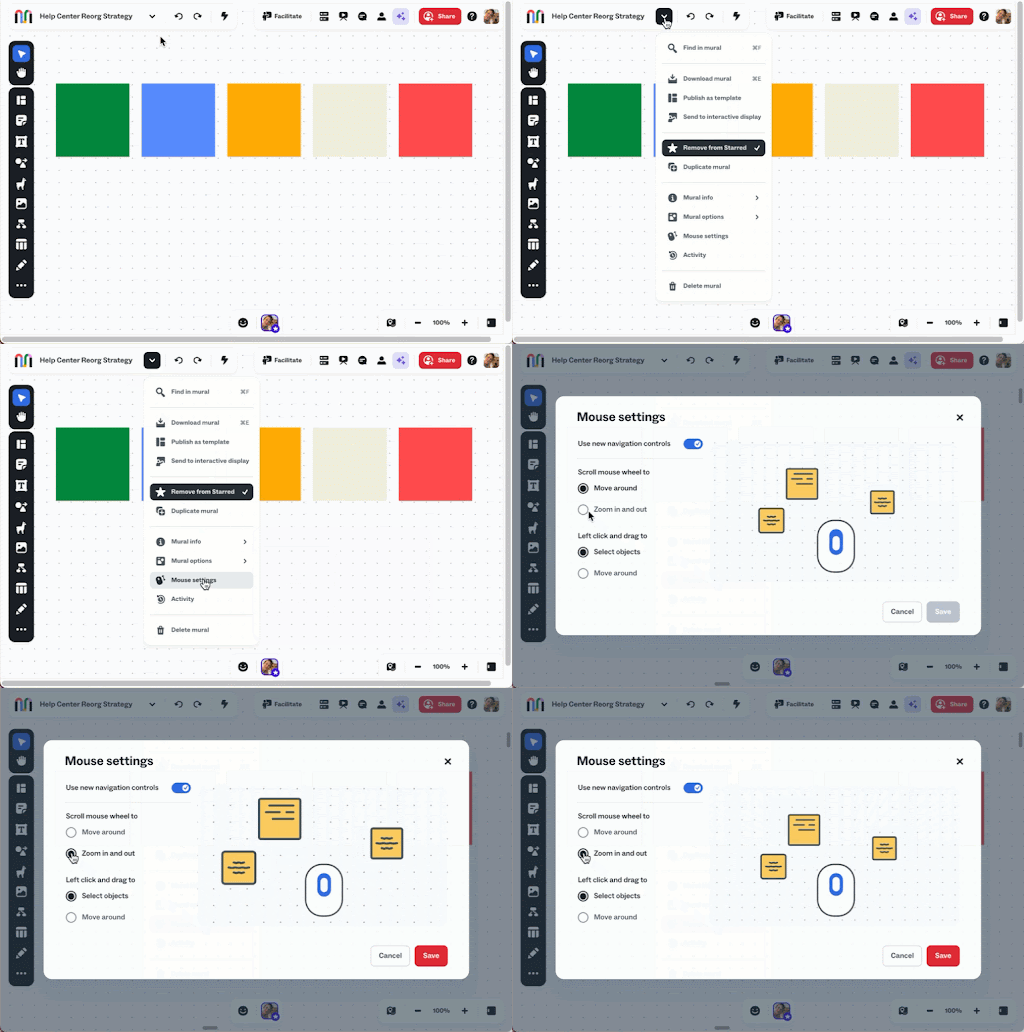
We’ve also updated navigation settings—now called Mouse settings and located in the mural dropdown—with clearer options for how you move around and interact with the canvas, including mouse wheel behavior for zooming or panning.
New features & enhancements
Here are a few more updates you’ll notice across Mural this week:
- More flexible areas fully rolled out – Nested areas are now available to all users, making it easier to organize and structure complex work.
- Smarter AI performance – AI-powered features are now faster, more reliable, and more cost-efficient behind the scenes.
- Admin control for integrations – Company admins can now set a default Salesforce or Rally instance, helping teams stay consistent across workflows.
Bug fixes
This week’s fixes focus on smoother workflows, stronger security, and fewer interruptions during your sessions.
- AI chat preview fix – Resolved an issue where previews were being auto-accepted more often than expected.
- Azure DevOps connection fixes – Restored expected behavior for users experiencing integration issues.
- More reliable Azure DevOps imports – Fixed an error that could cause imports to fail unexpectedly.
- Improved visitor interactions – Visitors can now paste using the right-click context menu in supported browsers.
- More stable resizing on migrated murals – Fixed an issue where resizing objects could trigger a false offline error and revert changes.
- Stronger PDF import security – Upgraded dependencies to address vulnerabilities and improve platform safety.
We’re continuing to refine the experience to give you more control and fewer interruptions as you collaborate. More updates coming soon!
WEEKLY UPDATE: MARCH 3
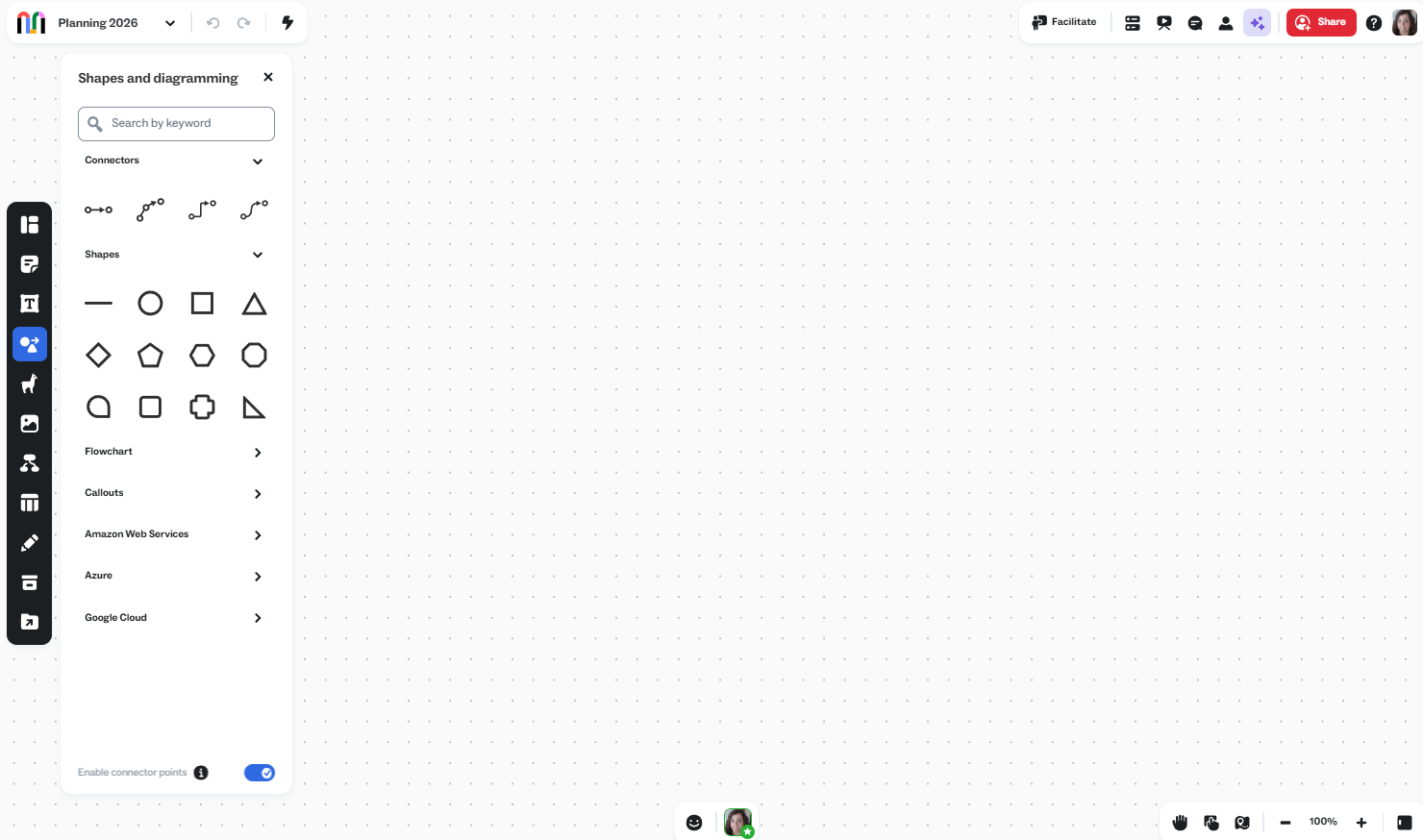
Improved shapes and diagramming panel
Find the connectors and shapes you need to diagram quickly.
Members and guests on Business and Enterprise plans can now access curated cloud architecture icon libraries from the Shapes and diagramming panel, including AWS, Azure, and Google Cloud.
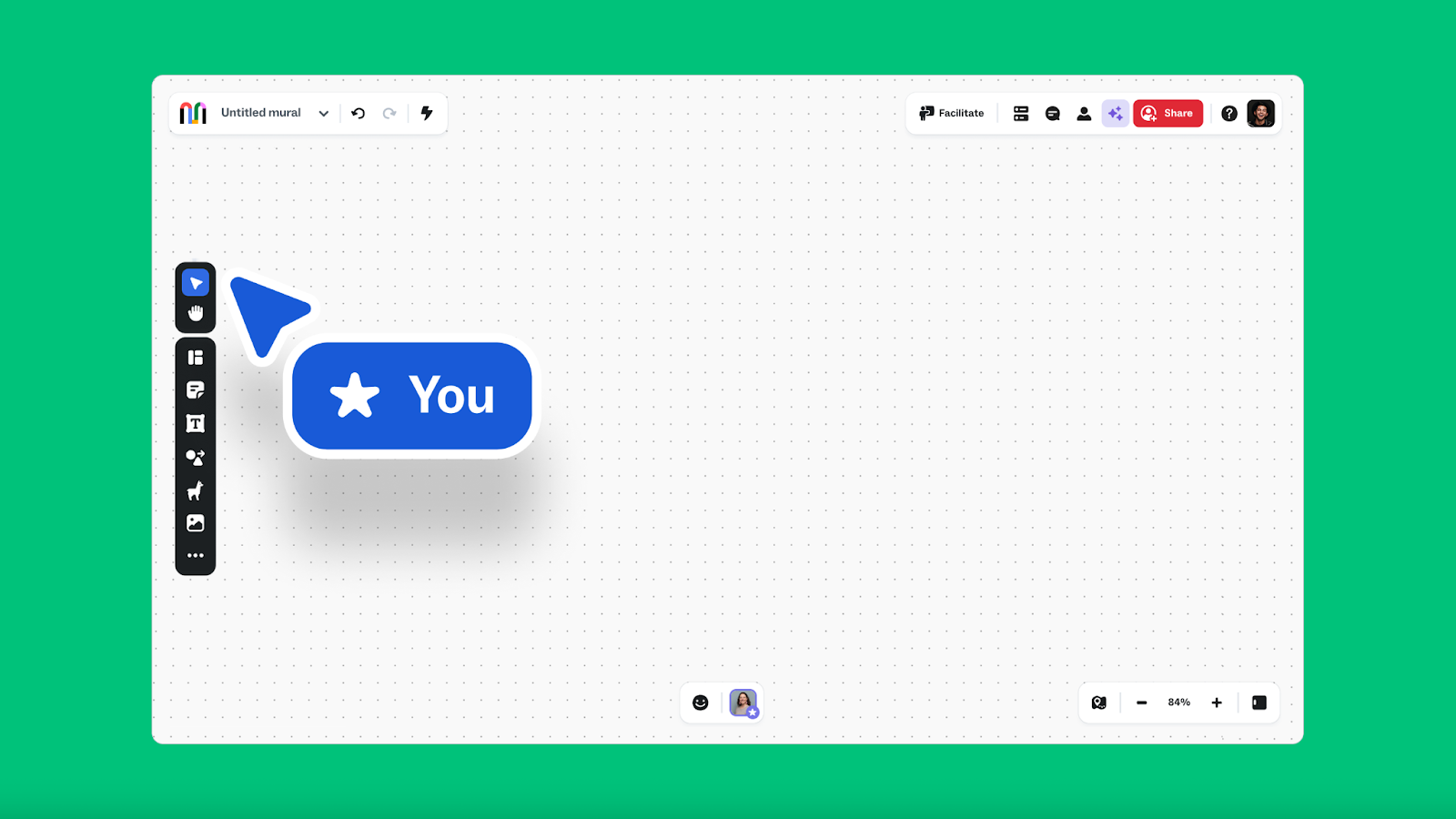
Easily navigate the canvas and zoom to what matters most
We’ve streamlined how you move, zoom, and interact on the canvas. Accomplish key tasks with fewer steps and less tool-hunting.
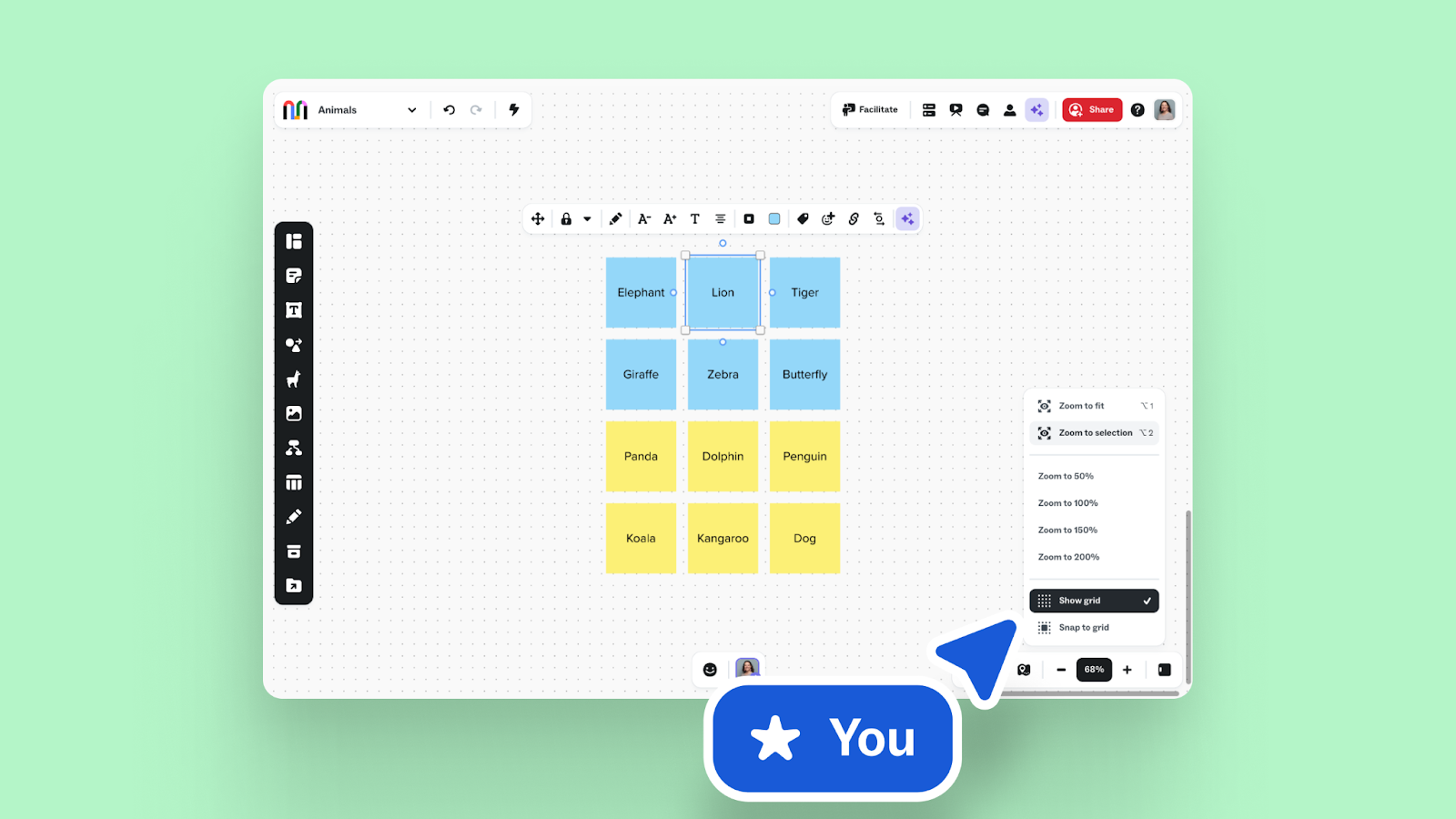
We know speed wins when you're using your canvas. Here's to moving quickly! See you next week for more updates.
February 2026
WEEKLY UPDATE: FEBRUARY 24
Smarter stakeholder mapping
Creating stakeholder maps and org charts with profile cards just got more reliable. We’ve improved the matching logic behind LinkedIn-enriched profile and company cards by incorporating company website data, name variants, and more flexible name matching.
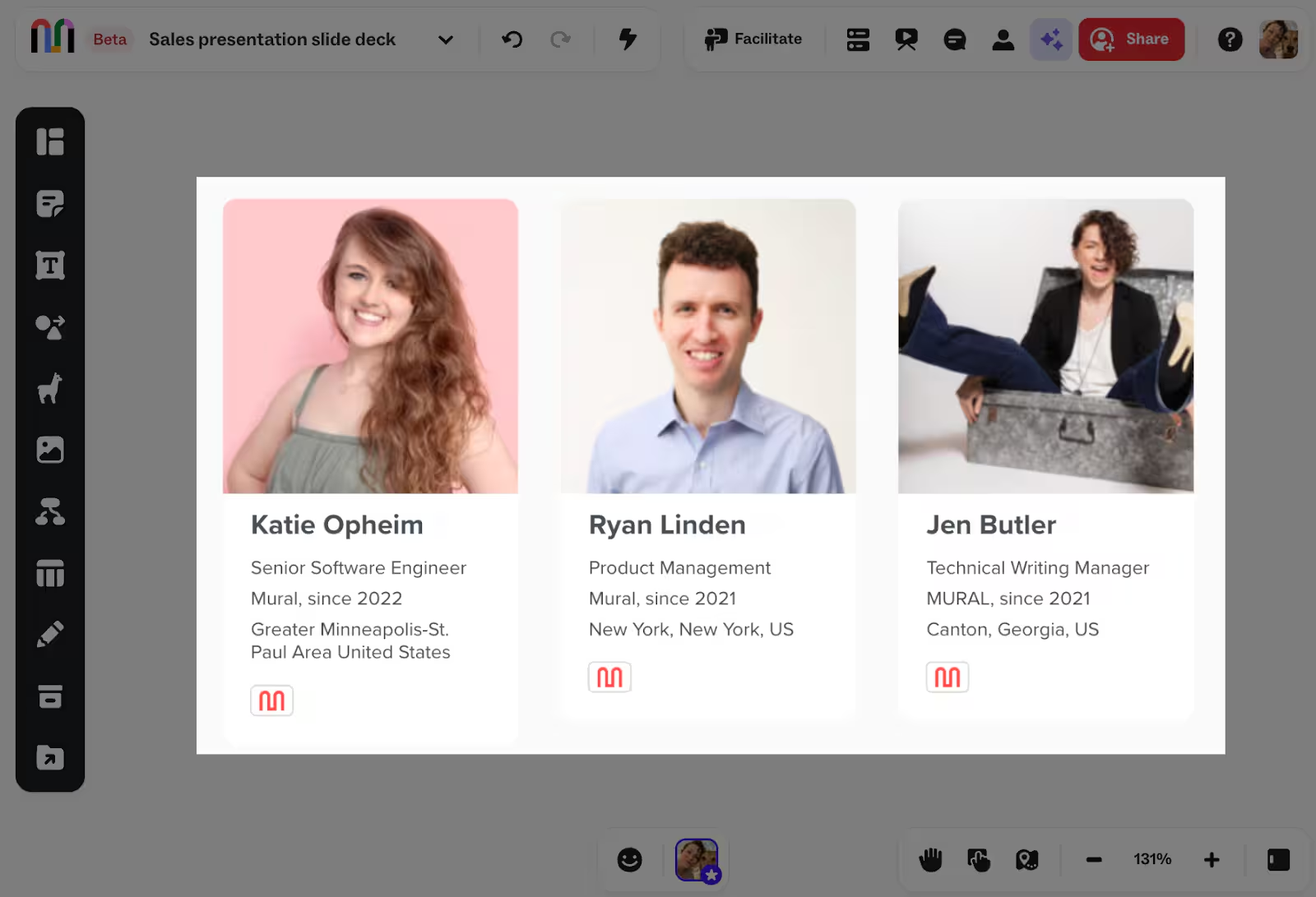
Whether you’re pasting a LinkedIn URL directly onto the canvas or importing contacts through the Salesforce integration, you’ll see higher match rates and fewer manual corrections—so you can focus on planning and relationship strategy instead of cleanup.
More flexible areas (Public preview)
We’ve rolled out improvements to areas that give you more control over how you organize content on the canvas:
- Drag one area into another.
- Resize an area to contain another area.
- Select existing objects (including areas), right-click, and choose Add to → Area to move them into a new parent area.
These updates make it easier to structure complex murals and keep large working sessions tidy and intuitive.
Bug fixes & improvements
This week’s updates bring smoother integrations, clearer reporting, and more predictable canvas behavior:
- LinkedIn links render correctly – Certain LinkedIn URLs (like post links) now display as photo objects instead of broken profile cards.
- LUMA Workplace links display properly – Links pasted from LUMA Workplace now render correctly on the canvas.
- More reliable group recovery – Recovering a group of objects no longer fails because of a single malformed link.
- “Copy link to object” restored – Objects migrated from Miro once again support “Copy link to object” for feature parity.
- Expanded reporting data – Added new data points to company and workspace reports, improving completeness and admin visibility.
There you have it: steady improvements, cleaner stakeholder maps, and more control over the areas on your canvas. See you next week for the next round of updates!
WEEKLY UPDATE: FEBRUARY 17
Seamless search—even when collaborating as a guest
Search now includes every mural you have access to, across all workspaces—including ones where you’ve been invited as a guest. No matter how you’re collaborating, you can quickly find the murals you’re part of.
This makes search more complete and intuitive, especially for teams that frequently work with external partners, vendors, or cross-company stakeholders.
Bug fixes & improvements
These updates bring steadier integrations and cleaner UI behavior:
- More reliable activity log images – External photo links now fall back to a plain image format when needed, reducing broken thumbnails and improving rendering resilience.
- Smoother Presentation mode – The presentation toolbar no longer blocks mouse events, so you won’t run into “clicks not working” during live sessions.
- Uninterrupted panning and zooming – Hovering over toolbar tooltips no longer blocks movement on the canvas.
- Jira integration fixes – Resolved a two-way sync issue where outdated Mural statuses could overwrite newer Jira statuses.
- Images panel improvements – Fixed a sidebar flash when clicking Unsplash photo objects and resolved a drag issue that could break the canvas when using Google image search results.
- Smarter Smart planner sync – Addressed delayed synchronization that caused sticky notes to disappear or update late for collaborators.
- More reliable Salesforce embeds – Fixed an intermittent “Error retrieving rooms” message when opening embedded murals in Salesforce.
Small fixes, steady enhancements—and a smoother experience across the canvas.
WEEKLY UPDATE: FEBRUARY 10
Smoother Jira workflows for planning and delivery
Many teams rely on the Mural + Jira two-way sync integration to stay aligned as work moves from planning to delivery. This week’s updates improve how Jira issues are found, synced, and displayed in Mural—especially for teams working with larger projects or frequent updates.
- More reliable Jira issue search – Searching by Jira issue key now consistently returns the correct issue within a project.
- Improved bulk sync accuracy – Resolved issues affecting bulk sync behavior and Jira status accuracy, so large updates stay dependable.
- Accurate story points from Jira Cloud – Numeric story point values now display correctly in Mural.
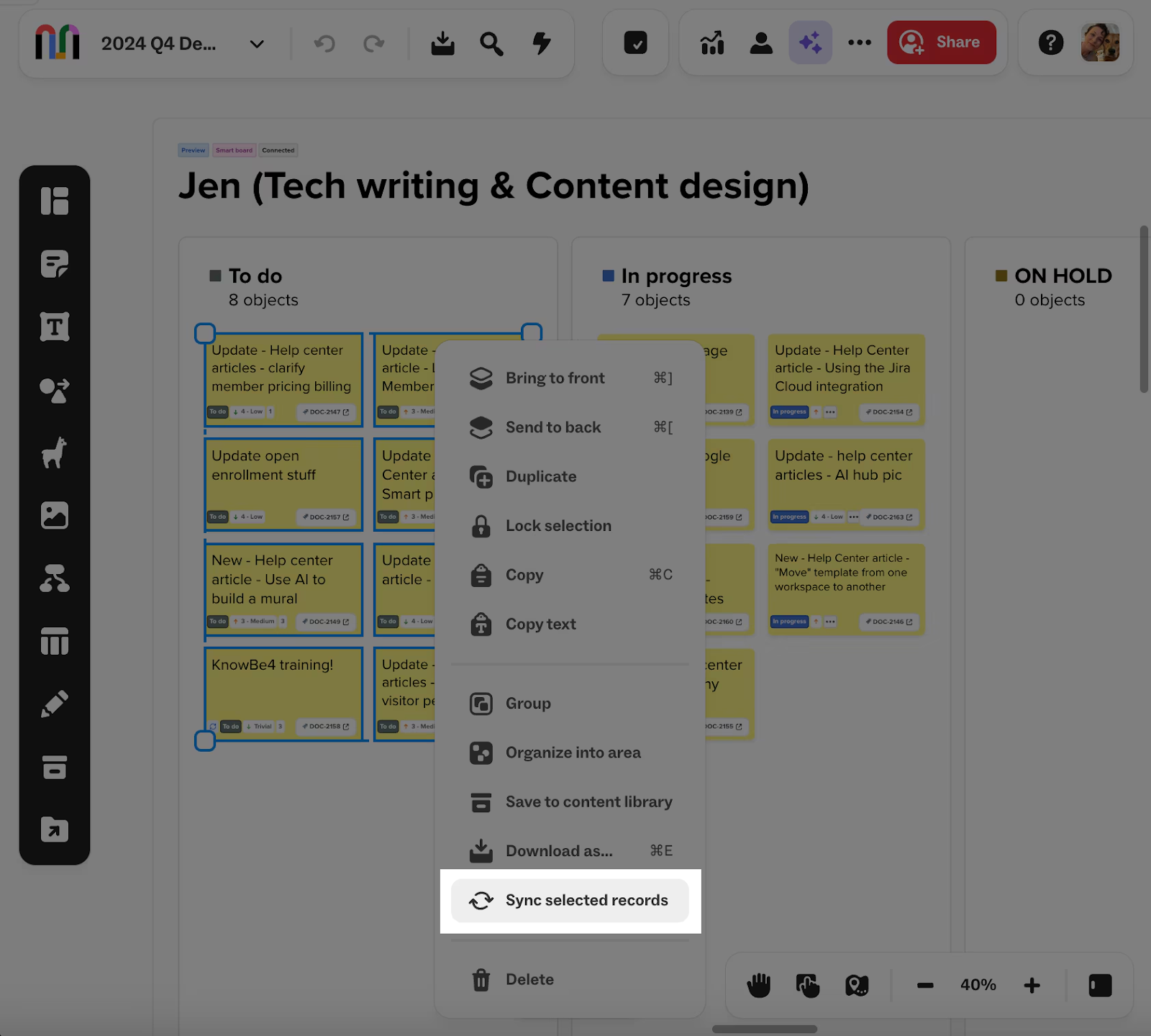
Whether you’re importing issues for sprint planning or syncing changes back to Jira, these improvements help keep Mural and Jira aligned.
Bug fixes & improvements
This week’s updates include a set of refinements that make everyday work in Mural feel smoother and more consistent:
- More dependable AI chat – Fixed an issue where some AI chat actions failed unexpectedly.
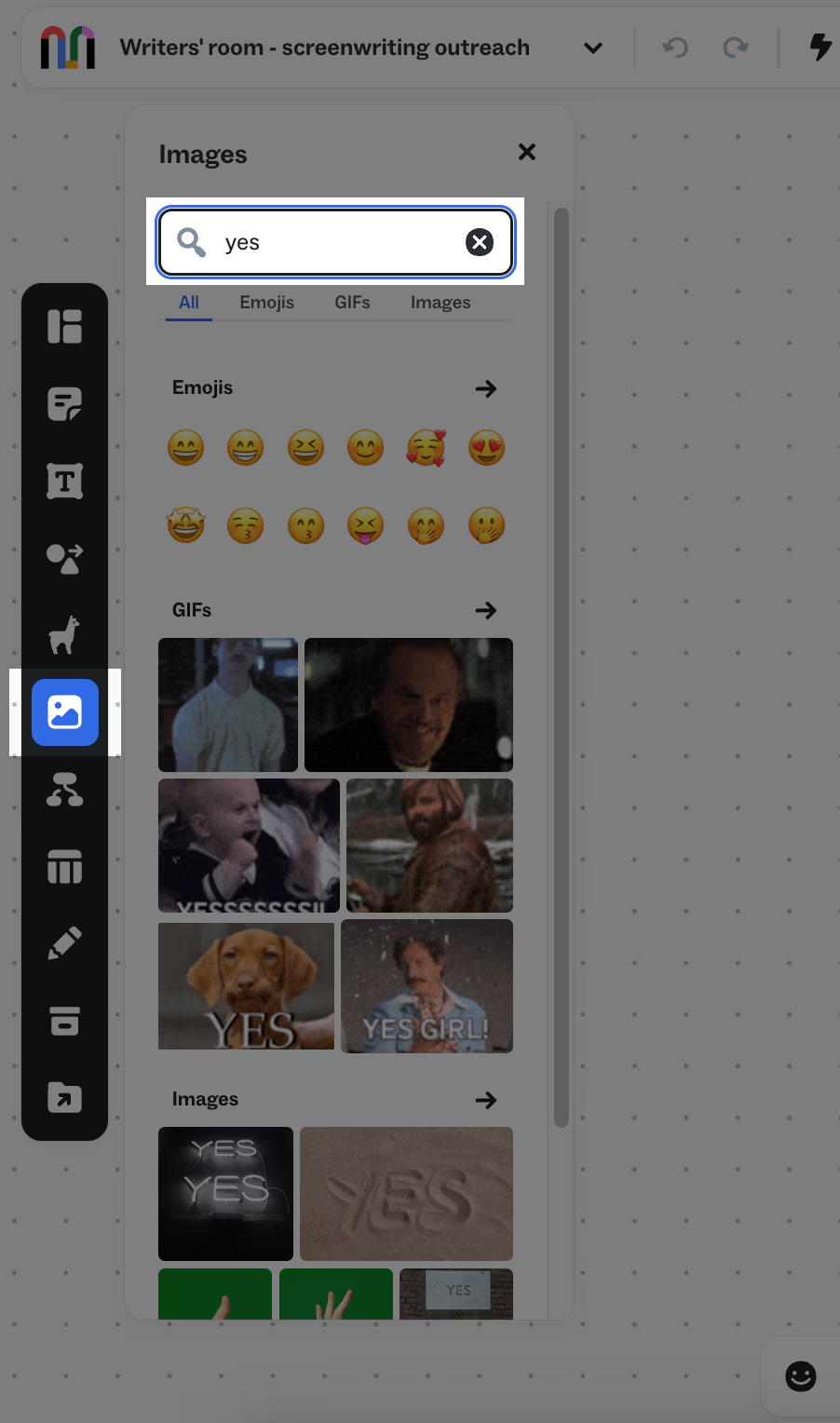
- Better emoji results in the Images panel – Emoji search in the Images panel now returns more contextual and relevant results.
- More reliable timers during facilitation – Timer controls now open consistently mid-session, with improved keyboard accessibility.
- Cleaner presentation mode – Comment widgets are now hidden during presentations and restored afterward, keeping presentations clean and distraction-free.
- More consistent access to the Archived murals page – Fixed the issue where the Archived murals page only appeared on the User options menu when accessed from the dashboard.
- Restored access for mural owners – Resolved an issue that could prevent owners from editing or downloading their own murals in specific encryption scenarios.
Lots of small changes, steady improvements—and a smoother experience across the board (er, canvas). 😉
WEEKLY UPDATE: FEBRUARY 3
New Images panel with built-in libraries
We’ve introduced a new Images panel that brings emojis, GIFs, and images into a single, unified experience. These built-in libraries are now available in one place, making it easier to browse and add visual elements directly to your mural.
As part of this update, we retired the Bing image search, helping keep the experience focused, reliable, and simple.
New data retention controls for Enterprise admins
Enterprise company admins can now define how long inactive murals stick around with data retention policies. These policies let you automatically archive and optionally delete murals based on inactivity rules you set.
This feature helps organizations manage content at scale, reduce risk, and support compliance and data governance requirements.
Interested in joining the private preview? Reach out to your Mural account representative or support@mural.co for more information.
Bug fixes & improvements
This week’s fixes focus on smoother workflows, clearer data, and fewer interruptions during collaboration:
- More accurate ownership in archives – Fixed an issue where archived murals incorrectly assumed the creator was always the owner.
- Visitors can add images again – Visitors can now use the Images button without being prompted to log in.
- Cleaner dates in reports – Customer-facing reports now use date fields (instead of datetimes), so exported data displays correctly in spreadsheets.
- Reactions, uninterrupted – Fixed a long-standing bug where the Summoned/Followed popup covered the Reactions bar.
Thanks for collaborating with us! We’ll keep refining the experience and sharing updates along the way.
January 2026
WEEKLY UPDATE: JANUARY 27
Review and manage integration requests from your company
Enterprise company admins can now see when users request new integrations—and take action right away. When a user submits a request from the integrations hub, all company admins receive a notification with the integration name and a direct path to enable it.
From the Integrations page in the company dashboard, admins can view how many users have requested each integration, approve the ones that matter most, and keep tighter control over which tools are enabled across the organization. It’s a simpler way to balance security, governance, and real user demand.
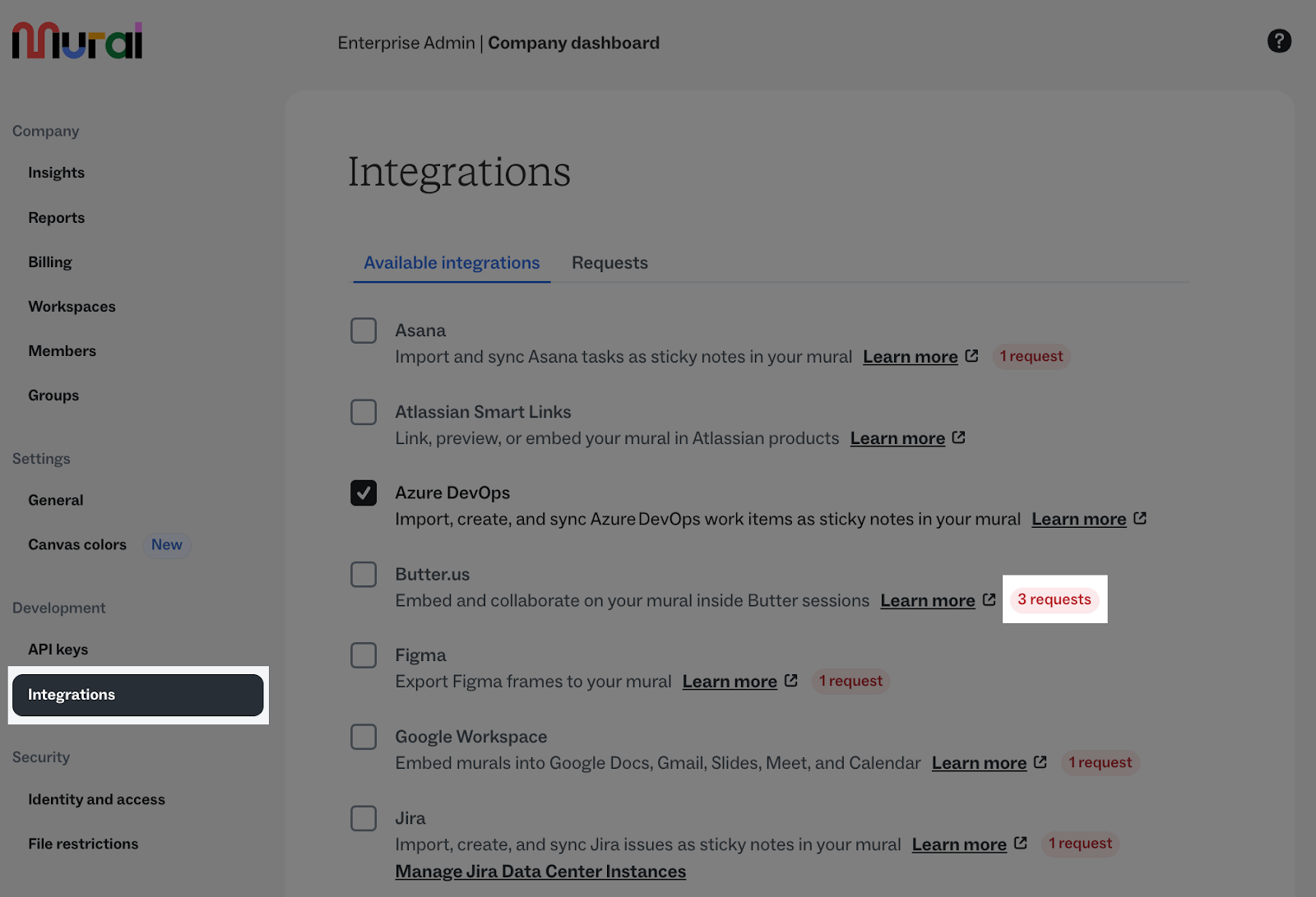
Available on Enterprise plans. Only Enterprise members (and Full Members on tiered pricing plans) can request integrations.
Bug fixes & improvements
This week’s fixes focus on reliability behind the scenes and smoother interactions on the canvas:
- More reliable data retention policies – Fixed an issue where retention runs could get stuck in a “running” state when no murals matched the policy.
- Improved data retention management – Resolved a bug that prevented company admins from creating or saving data retention policies.
- Cleaner AI sticky clustering results – Fixed an issue where clustering oversized sticky notes could result in incorrect sizing.
We’re continuing to make it easier for admins to manage Mural at scale—while keeping everyday collaboration running smoothly.
WEEKLY UPDATE: JANUARY 20
Quicker guest reactivation, fewer handoffs
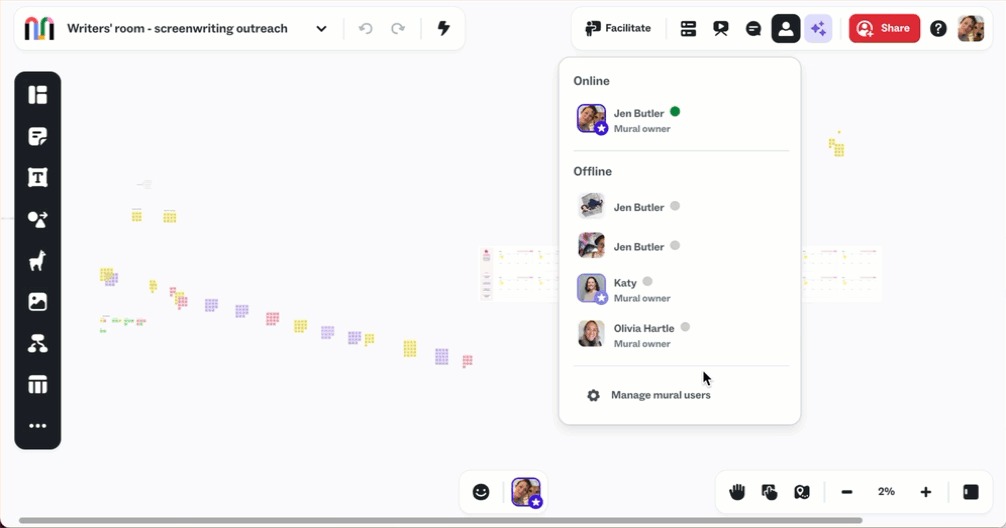
When collaborators outside your organization (such as consultants or partners) are essential to your work, reinstating guest access to murals shouldn’t slow active collaboration.
When enabled by a company admin, room admins and mural owners can now reactivate guests directly from the “Manage users” pages for their rooms and murals.
This gives teams a quicker, more flexible way to restore guest access when it’s needed — without routing every request through a workspace admin.
Bug fixes & improvements
This week’s updates focus on reliability and smoother work on the canvas:
- Template loading fix – Resolved an issue where a specific template wouldn’t load when added as a canvas widget.
- Table stability – Fixed a bug that could cause table widgets to behave inconsistently after certain edits, helping prevent new table corruption going forward.
That’s it for this week! Enjoy more dependable templates, sturdier tables, and faster ways to manage access for the people you collaborate with most.
WEEKLY UPDATE: JANUARY 13
Bulk sync now available for more two-way sync integrations
Bulk sync is now available across more of our two-way sync integrations, making it faster and easier to keep your work aligned between Mural and the tools you already use. You’ll now find bulk sync available for Rally, Salesforce, Asana, and Microsoft Planner.
This reduces manual setup and minimizes repetitive actions when syncing work at scale, helping teams keep murals and connected tools up to date with less effort.
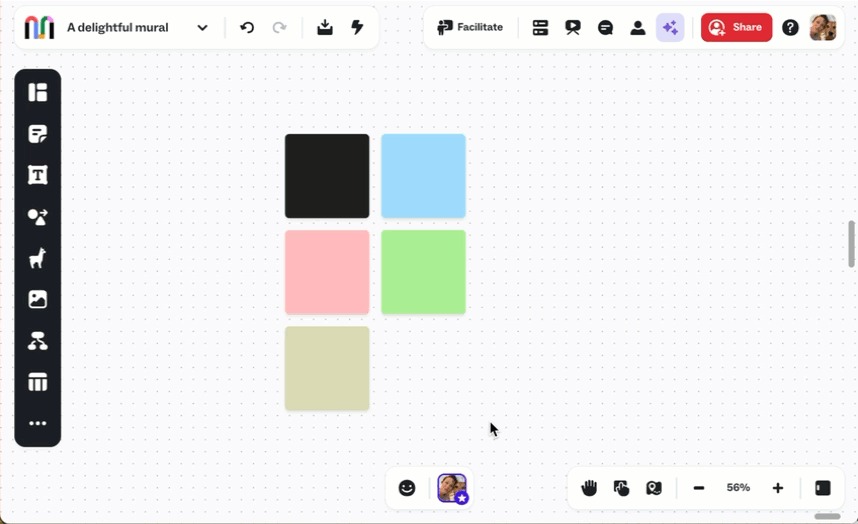
Enhancements to our company colors and themes
We’re also continuing to polish our company colors and themes experience. Updates include cleaner modals, clearer tooltips, improved spacing and visual consistency, and better-aligned themes tables.
Bug fixes & improvements
This week’s fixes improve AI clustering layout and reduce friction across our Salesforce integration.
- Improved Salesforce embed error handling – Improved the embed error experience so users who encounter an error after selecting a mural can return to the Mural dashboard, similar to the browser experience.
- Salesforce chat widget reliability – Fixed an issue where the chat widget did not appear for authenticated users on refresh, with improved error handling and script loading safeguards.
- AI clustering layout fixes – Fixed an issue where clustering by topic did not respect connector order. Connectors now stack correctly, and newly created areas are free-form instead of grid-based.
We're focused on reducing the steps between planning and doing, so your team can get to action sooner. More updates are on the way.
WEEKLY UPDATE: JANUARY 6
Stay on-brand with company colors and themes
We launched company colors and company themes for Enterprise customers. Company admins can now upload brand colors and create reusable color themes, making it easier for teams to stay on-brand across murals.
Once set up, everyone in the company can access these colors and themes directly from the color picker on the canvas.
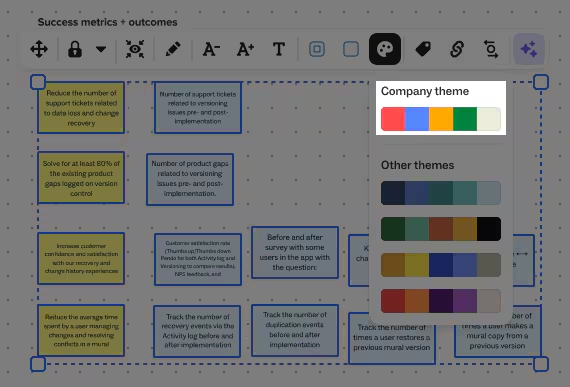
Available at the company level (not individual workspaces).
New features & enhancements
And a couple more updates you’ll notice across Mural this week:
- Splunkbase integration update – Packaged and released a new version of the mural-splunk-app on Mural | Splunkbase.
- Clearer workspace context when creating murals from templates –
- We added a helpful warning in the Create mural modal if you’re about to create a mural in a different workspace than where the template originated.
- To keep things smooth, we also default the workspace dropdown to the template’s original workspace.
We’re continuing to refine the experience with small, thoughtful improvements that help teams move faster and stay aligned. More updates coming soon!
2025 releases
Explore our 2025 releases here.