On this page
Template use cases
Use Product roadmap template
Get started
Visualize product strategy, timelines, and priorities in one place

A product roadmap template is a shared visual plan that lays out what your team is building, when each milestone lands, and why each initiative matters. Rather than scattering priorities across slide decks, spreadsheets, and status emails, a product roadmap pulls goals, features, timelines, and dependencies into one view everyone can reference. What you end up with is a living document that keeps product managers, engineers, designers, and go-to-market partners working from the same set of priorities.
That shared visibility matters more than most teams realize. There’s an eye-popping stat that says 51% of professionals don’t believe they’re collaborating well with their teams. A well-structured product roadmap template closes that gap by giving every stakeholder a clear, visual reference for what’s happening now, what’s coming next, and how their work fits into the bigger picture.
Mural’s product roadmap template is built for the way cross-functional product teams actually work: visually, collaboratively, and iteratively. Here’s what it makes possible.
When product strategy lives in a visual workspace that everyone can see and contribute to, misalignment drops fast. The template gives product managers, engineering leads, scrum masters, and go-to-market partners a single view of goals, priorities, and timelines, so conversations shift from “what are we doing?” to “how do we move this forward?” You can learn more about organizational alignment for R&D teams here.
You’re probably well aware that not every feature request deserves the same urgency. The template helps your team categorize initiatives by impact and effort, so you’re spending capacity on the work that moves the product forward. Pair it with Mural AI’s clustering and summarize features to synthesize customer feedback, support tickets, and stakeholder input into clear priority groupings before your next planning session.
Static roadmaps break the moment something changes. In Mural, your product roadmap template lives on an infinite canvas that your team can update in real time or asynchronously. Add sticky notes, comments, and tags to capture new information as it arrives, and use Facilitation Superpowers® to run structured planning sessions that keep the roadmap grounded in reality, not wishful thinking.
Step 1: Start with your product vision
Open the template and define your product’s purpose, target users, and the outcomes you’re building toward. This section becomes the north star the rest of the roadmap references, so keep it specific enough that anyone on the team can explain it in a sentence.
Step 2: Set measurable goals
Identify the 3–5 goals that will define success for the next quarter or half. Tie each goal to a specific metric, whether that’s adoption rate, NPS improvement, or revenue impact. If you need a framework, Mural’s product KPIs guide walks through how to define and prioritize the right success metrics.
Step 3: Map your timeline
Break product development into phases (months or quarters work well for most teams) and plot your key milestones: feature releases, beta launches, research sprints, and review checkpoints. The template’s Gantt-style layout helps your team see how work sequences across the calendar.
Step 4: Add features and initiatives
Drop each planned feature, enhancement, or initiative into the appropriate phase. Organize them by priority (must-ship, planned, exploratory) so your team knows where to focus first. Use color coding or tags to distinguish between workstreams, teams, or product areas.
Step 5: Surface dependencies
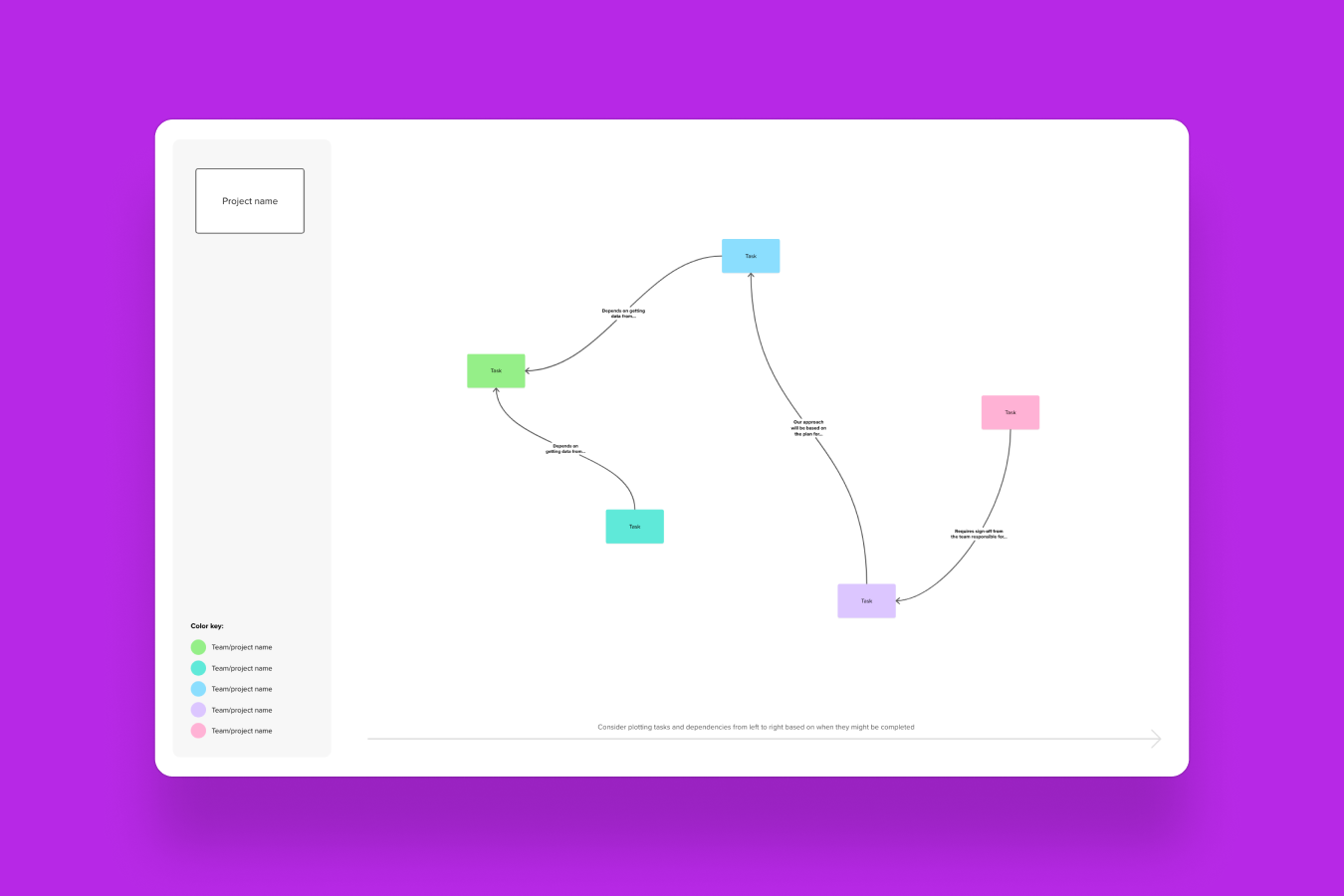
Use connectors to draw relationships between items that depend on each other, whether that’s a third-party integration, a design deliverable, or another team’s API. Making dependencies visible now prevents bottlenecks later. If your team works in Jira or Azure DevOps, Mural’s two-way sync keeps roadmap items and tickets connected automatically.
Step 6: Review, share, and iterate
Use Presentation mode to walk stakeholders through the roadmap one section at a time, then open the mural for collaborative feedback. As new customer insights, market shifts, or capacity changes come in, update the roadmap directly. A good product roadmap isn’t a one-time artifact; it’s an ongoing conversation your team keeps coming back to.
A product roadmap template for teams works best when every function involved in building and launching the product has a clear role in it. Here’s how different roles typically engage with the template.
Product managers define the product vision, prioritize features by business impact, and set quarterly milestones that connect customer needs to delivery timelines. The outcome is a single source of truth the entire team rallies around.
Scrum masters translate roadmap priorities into sprint-level work, flag dependencies between teams, and keep cross-functional handoffs visible. The result is fewer surprises mid-sprint and faster resolution of blockers.
Engineering leads assess technical feasibility, surface capacity constraints early, and map infrastructure work alongside feature delivery. This produces realistic timelines that account for technical debt and platform needs.
UX researchers attach customer evidence (interview insights, usability findings) directly to roadmap items so prioritization reflects real user needs. The outcome is product decisions grounded in research, not assumptions.
GTM and marketing align campaign timelines and launch messaging with upcoming releases so go-to-market plans stay synchronized. The result is coordinated launches with consistent messaging across channels.
80% of R&D teams say they struggle to collaborate effectively with their stakeholders and gather the input they need to move products forward. A visual product roadmap for team collaboration gives every role listed above a shared space to contribute, instead of relying on fragmented handoff chains.
Your team has validated a new product concept and needs to translate early research into a buildable plan. A product manager opens the template, maps the initial feature set against a quarterly timeline, and invites engineering, design, and marketing to pressure-test the sequence. Everyone leaves the session with a shared view of what’s first, what’s next, and what’s still being explored.
A scrum master preparing for the next release cycle uses the roadmap to organize upcoming features by sprint, flag dependencies between teams, and confirm that QA and documentation timelines are accounted for. Because the roadmap lives in Mural, the engineering lead can add capacity notes and the product manager can reprioritize items asynchronously, without scheduling another meeting.
57% of product manufacturers wish they had better alignment between their product strategy and their business goals. When a product team needs to align R&D, sales, and marketing around what’s shipping and when, the visual roadmap becomes the single reference point. Use Mural’s visual roadmap alignment capabilities to keep go-to-market timing in sync with development milestones.
At the end of each quarter, the product team revisits the roadmap to assess what shipped, what slipped, and what the team learned. Compare the original plan to actual outcomes, capture retro insights directly on the canvas, and adjust the next quarter’s priorities accordingly. This turns the roadmap into a record of decisions, not just intentions.
Time-box your planning sessions
Product roadmap planning can expand to fill whatever time you give it. Set a 90-minute cap, break the session into focused blocks (vision review, prioritization, timeline mapping), and use Mural’s built-in timer to keep the group moving. You’ll make sharper decisions with a deadline than without one.
Start with outcomes, not features
It’s tempting to jump straight to a list of features. Resist. Begin by defining what success looks like for users and the business, then work backward to the initiatives that get you there. This keeps the roadmap anchored to real value rather than a wish list.
Involve the right people early
Product roadmap strategy improves when engineering, design, and go-to-market weigh in before priorities are locked. Use Mural’s voting, commenting, and clustering features to gather structured input from contributors, so the roadmap reflects collective expertise, not a single perspective.
Make dependencies visible from day one
The most common roadmap surprises come from dependencies nobody documented. Use connectors and tags to map relationships between initiatives, teams, and external factors. When something shifts, you’ll see the downstream impact immediately.
Treat your roadmap as a living plan
The best product roadmap templates aren’t finished documents; they’re workspaces that evolve. Schedule a brief check-in every two weeks to update status, reprioritize as new data comes in, and retire items that no longer make sense. Consistency beats perfection.
Your next planning session is already on the calendar. Open Mural’s product roadmap template and start building a visual plan your whole team can contribute to. Get started with the template, or book a demo to see how Mural fits into your team’s product planning workflow.
A product roadmap’s purpose is to connect your product vision to the specific work your team does every sprint, quarter, and year. It answers three questions at once: what are we building, when will it happen, and why does it matter? For cross-functional teams, the roadmap also serves as a coordination layer, helping engineering, design, marketing, and sales stay in sync without constant status meetings.
A product roadmap template gives your team a ready-made structure so you spend less time formatting and more time planning. It creates consistency across planning cycles, makes it easier for new team members to understand priorities quickly, and provides a shared visual workspace where everyone can contribute. In Mural, the template also connects to features like AI-powered clustering, Facilitation Superpowers, and integrations with Jira and Azure DevOps, so your roadmap stays connected to the work happening in your development tools.
Mural’s product roadmap template includes a Gantt-style timeline broken into quarterly or monthly phases, sections for product vision and strategic goals, color-coded swim lanes for different workstreams or teams, milestone markers for key releases and checkpoints, and space for dependencies and notes. The template is fully customizable: add rows for additional teams, extend the timeline, or restructure the layout to match how your organization plans. You can also use sticky notes, comments, tags, and connectors to add context as your plan evolves.
Product roadmap templates are valuable for anyone involved in building, launching, or supporting a product. Product managers use them to define and communicate priorities. Engineering leads use them to plan capacity and flag technical risks. Scrum masters use them to connect sprint-level work to strategic goals. UX researchers attach customer evidence to roadmap items. And go-to-market teams use them to coordinate launches. If your role touches the product lifecycle, the roadmap is where your work connects to everyone else’s.